Join us at FabCon Atlanta from March 16 - 20, 2026, for the ultimate Fabric, Power BI, AI and SQL community-led event. Save $200 with code FABCOMM.
Register now!The Power BI Data Visualization World Championships is back! Get ahead of the game and start preparing now! Learn more
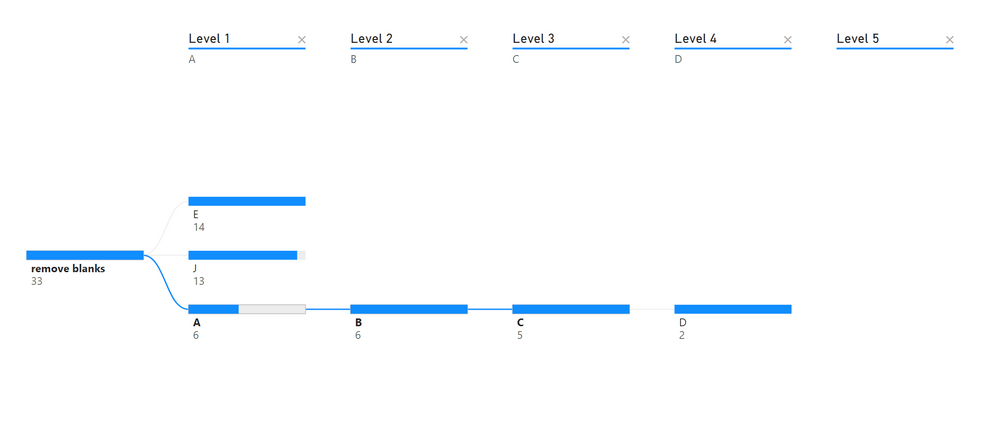
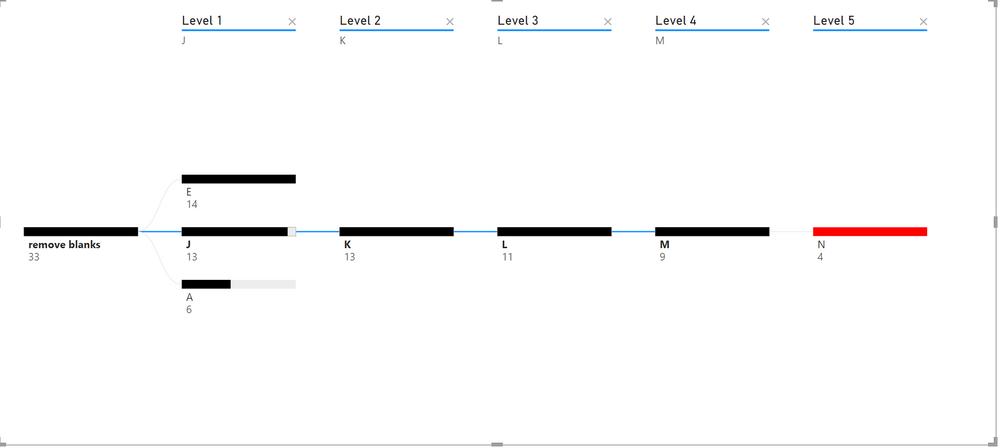
I have different level of hierarchy for which I am using decomposition tree for visualization. Some of the levels have null values. I used code below to remove the null values from showing in the tree. However, I would like to color code the last level before null value, so that users would know that they have reached the end for that specific path.
Solved! Go to Solution.
I created a measure and used that measue for bar color formatting.
Hi @bharukc ,
You can try using the LASTNOTBLAN() function or the FLITER() function to filter out the last non-null value, display it as a visual such as a card, and then set the color for the last non-null value.
You can refer to the following posts that may be helpful to you:
Solved: Decomposition Conditional Formatting - Microsoft Power BI Community
Solved: color formatting for decomposition tree - Microsoft Power BI Community
Solved: Need to get the last non blank value to use it in ... - Microsoft Power BI Community
Solved: Get most recent non-null value? - Microsoft Power BI Community
Solved: DAX Take the last non-null value in column until t... - Microsoft Power BI Community
Best Regards,
Neeko Tang
If this post helps, then please consider Accept it as the solution to help the other members find it more quickly.
Hi @Anonymous ,
none of the things I tried using all the links brought me the solution.
Below is the example source data. Is there a way to put my pbix file here?
| ID | Level 1 | Level 2 | Level 3 | Level 4 | Level 5 |
| 1 | A | B | C | D | |
| 2 | A | B | C | ||
| 3 | E | F | G | H | I |
| 4 | E | F | G | ||
| 5 | E | F | G | H | |
| 6 | A | B | |||
| 7 | E | F | |||
| 8 | J | K | L | M | N |
| 9 | J | K | L | ||
| 10 | J | K | |||
| 11 | J | K | L | M | |
| 12 | J | K | L | M | |
| 13 | J | K | L | M | |
| 14 | A | B | C | D | |
| 15 | A | B | C | ||
| 16 | E | F | G | H | I |
| 17 | E | F | G | ||
| 18 | E | F | G | H | |
| 19 | E | F | |||
| 20 | J | K | L | M | N |
| 21 | J | K | L | ||
| 22 | J | K | |||
| 23 | J | K | L | M | |
| 24 | J | K | L | M | |
| 25 | A | B | C | ||
| 26 | E | F | G | H | I |
| 27 | E | F | G | ||
| 28 | E | F | G | H | |
| 29 | E | F | |||
| 30 | J | K | L | M | N |
| 31 | E | F | G | H | |
| 32 | E | F | |||
| 33 | J | K | L | M | N |
I created a measure and used that measue for bar color formatting.
Can you confirm if Sheet1[Level 5 no blank] is a new column created by you? if so, what's the formula used to create it?
It would be really helpful if you can attach the file
Check out the November 2025 Power BI update to learn about new features.
Advance your Data & AI career with 50 days of live learning, contests, hands-on challenges, study groups & certifications and more!
| User | Count |
|---|---|
| 21 | |
| 10 | |
| 9 | |
| 4 | |
| 4 |
| User | Count |
|---|---|
| 34 | |
| 31 | |
| 20 | |
| 13 | |
| 12 |