cancel
Showing results for 
Search instead for 
Did you mean: 

The Power BI Data Visualization World Championships is back! Get ahead of the game and start preparing now! Learn more

Reply
egakagoc2xi
Frequent Visitor

Carrying over last week totals

Hello Everyone,


I would like to be able to help me with this problem that I currently have.


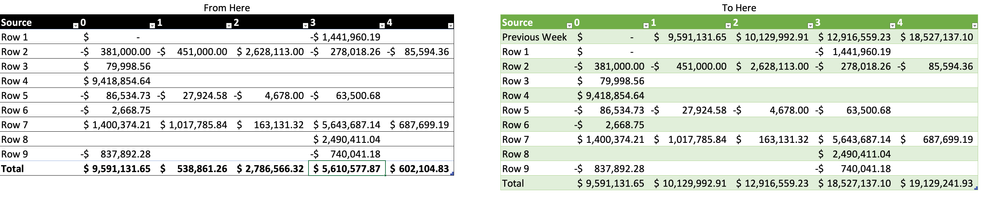
I have a table with 3 fields (Source, WeekOffset, Amount), in the first table of the image you can simply see the organization of the matrix:

  • Row: Source
  • Columns: WeekOffset
  • Values: Amount


The problem is that I need the total each week offset to be the start of the following week. Just like an opening balance.


Does anyone know how this can be done?


I thank you in advance for your cooperation.


Captura de pantalla 2022-12-18 a la(s) 20.06.03.png

1 ACCEPTED SOLUTION
Jihwan_Kim
Super User
Super User

Hi,

I am not sure if I understood your question correctly, but I tried to create a sample pbix file like below.

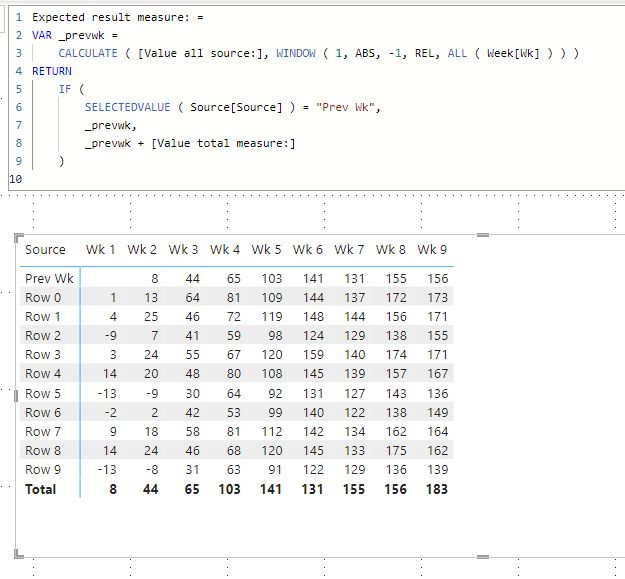
Please check the below picture and the attached pbix file.

I hope the below can provide some ideas on how to create a solution for your datamodel.


Jihwan_Kim_1-1671456892472.png


Jihwan_Kim_0-1671456820526.png


Value total measure: = 
SUM( Data[Value] )


Value all source: =
CALCULATE ( [Value total measure:], ALL ( Source[Source], Source[Index] ) )


Expected result measure: =
VAR _prevwk =
    CALCULATE ( [Value all source:], WINDOW ( 1, ABS, -1, REL, ALL ( Week[Wk] ) ) )
RETURN
    IF (
        SELECTEDVALUE ( Source[Source] ) = "Prev Wk",
        _prevwk,
        _prevwk + [Value total measure:]
    )


If this post helps, then please consider accepting it as the solution to help other members find it faster, and give a big thumbs up.


Click here to visit my LinkedIn page

Click here to schedule a short Teams meeting to discuss your question.

View solution in original post

2 REPLIES 2
Jihwan_Kim
Super User
Super User

Hi,

I am not sure if I understood your question correctly, but I tried to create a sample pbix file like below.

Please check the below picture and the attached pbix file.

I hope the below can provide some ideas on how to create a solution for your datamodel.


Jihwan_Kim_1-1671456892472.png


Jihwan_Kim_0-1671456820526.png


Value total measure: = 
SUM( Data[Value] )


Value all source: =
CALCULATE ( [Value total measure:], ALL ( Source[Source], Source[Index] ) )


Expected result measure: =
VAR _prevwk =
    CALCULATE ( [Value all source:], WINDOW ( 1, ABS, -1, REL, ALL ( Week[Wk] ) ) )
RETURN
    IF (
        SELECTEDVALUE ( Source[Source] ) = "Prev Wk",
        _prevwk,
        _prevwk + [Value total measure:]
    )


If this post helps, then please consider accepting it as the solution to help other members find it faster, and give a big thumbs up.


Click here to visit my LinkedIn page

Click here to schedule a short Teams meeting to discuss your question.

Yes this is pefect!.


I didn't have a Source table, only a Calendard an Detail table, but I will create the Source table from values and add the Previous Week.


Thanks a lot

Helpful resources

Announcements
November Power BI Update Carousel

Power BI Monthly Update - November 2025

Check out the November 2025 Power BI update to learn about new features.

Fabric Data Days Carousel

Fabric Data Days

Advance your Data & AI career with 50 days of live learning, contests, hands-on challenges, study groups & certifications and more!

FabCon Atlanta 2026 carousel

FabCon Atlanta 2026

Join us at FabCon Atlanta, March 16-20, for the ultimate Fabric, Power BI, AI and SQL community-led event. Save $200 with code FABCOMM.