Get Fabric or SQL Certified for Free.
Get certified for free when you join Fabric Data Days 2026 and dive into Fabric, Power BI, SQL, AI, and other essential data skills.
Join now- Power BI forums
- Get Help with Power BI
- Desktop
- Service
- Report Server
- Power Query
- Mobile Apps
- Developer
- DAX Commands and Tips
- Custom Visuals Development Discussion
- Health and Life Sciences
- Power BI Spanish forums
- Translated Spanish Desktop
- Training and Consulting
- Instructor Led Training
- Dashboard in a Day for Women, by Women
- Galleries
- Data Stories Gallery
- Themes Gallery
- Contests Gallery
- QuickViz Gallery
- Quick Measures Gallery
- Visual Calculations Gallery
- Notebook Gallery
- Translytical Task Flow Gallery
- TMDL Gallery
- R Script Showcase
- Webinars and Video Gallery
- Ideas
- Custom Visuals Ideas (read-only)
- Issues
- Issues
- Events
- Upcoming Events
Try your skills in the Power BI Dataviz World Championship! Round one ends June 26. Join now
- Power BI forums
- Forums
- Get Help with Power BI
- DAX Commands and Tips
- Re: Calculating based on Previous Rows
- Subscribe to RSS Feed
- Mark Topic as New
- Mark Topic as Read
- Float this Topic for Current User
- Bookmark
- Subscribe
- Printer Friendly Page


- Mark as New
- Bookmark
- Subscribe
- Mute
- Subscribe to RSS Feed
- Permalink
- Report Inappropriate Content
Calculating based on Previous Rows
Hi All,
Data---> FILE
I have following querry:
I want to create a measure that can calculate future emission (i.e. Forecast =Y) with 15 Percent of increase. To get the acquired furure results I want to take June total emission from month of August as it considered as to peak emission month. For Septemeber forecast, I would like to multiply with 15% to August Emission value. Smilarly for October forecast, I multiply 15% with Septemeber emission.
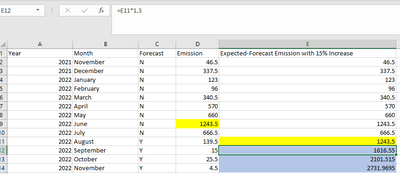
I tried with following measure but it is not giving acquired results.
Thankyou in anticipation,
Solved! Go to Solution.


- Mark as New
- Bookmark
- Subscribe
- Mute
- Subscribe to RSS Feed
- Permalink
- Report Inappropriate Content
Hi @sam_hoccane
Here is the sample file with the modification https://www.dropbox.com/t/w8M4gpY3GYZeSNKa
Comulative 30% Increase =
SUMX (
    VALUES ( data[Year_Month] ),
    CALCULATE (
        VAR Percentage = 0.3
        VAR CurrentDate = MAX (  data[Date] )
        VAR CurrentForecast = SELECTEDVALUE ( data[Forecast] )
        VAR CurrentEmission = SUM ( data[Emission] )
        VAR SummaryTable =
            CALCULATETABLE (
                SUMMARIZE (
                    Data,
                    data[Year_Month],
                    "@Date", MAX ( data[Date] ),
                    "@Forcast", SELECTEDVALUE ( data[Forecast] ),
                    "@Emission", SUM ( data[Emission] )
                ),
                ALLEXCEPT ( data, data[Travel Source], data[Manager] )
            )
        VAR NTable = FILTER ( SummaryTable, [@Forcast] = "N" )
        VAR YTable = FILTER ( SummaryTable, [@Forcast] = "Y" )
        VAR Last2NRecords = TOPN ( 2, NTable, [@Date] )
        VAR PenultimateNDate = MINX ( Last2NRecords, [@Date] )
        VAR PenultimateNEmission= MINX ( FILTER ( Last2NRecords, [@Date] = PenultimateNDate ), [@Emission] )
        VAR YTableBefore = FILTER ( YTable, [@Date] < CurrentDate )
        VAR Result =
            IF (
                CurrentForecast = "N",
                CurrentEmission,
                PenultimateNEmission * POWER ( 1 + Percentage, COUNTROWS ( YTableBefore ) )
            )
        RETURN
            Result
    )
)- Mark as New
- Bookmark
- Subscribe
- Mute
- Subscribe to RSS Feed
- Permalink
- Report Inappropriate Content
Hi @sam_hoccane
Here is the sample file with the modification https://www.dropbox.com/t/w8M4gpY3GYZeSNKa
Comulative 30% Increase =
SUMX (
    VALUES ( data[Year_Month] ),
    CALCULATE (
        VAR Percentage = 0.3
        VAR CurrentDate = MAX (  data[Date] )
        VAR CurrentForecast = SELECTEDVALUE ( data[Forecast] )
        VAR CurrentEmission = SUM ( data[Emission] )
        VAR SummaryTable =
            CALCULATETABLE (
                SUMMARIZE (
                    Data,
                    data[Year_Month],
                    "@Date", MAX ( data[Date] ),
                    "@Forcast", SELECTEDVALUE ( data[Forecast] ),
                    "@Emission", SUM ( data[Emission] )
                ),
                ALLEXCEPT ( data, data[Travel Source], data[Manager] )
            )
        VAR NTable = FILTER ( SummaryTable, [@Forcast] = "N" )
        VAR YTable = FILTER ( SummaryTable, [@Forcast] = "Y" )
        VAR Last2NRecords = TOPN ( 2, NTable, [@Date] )
        VAR PenultimateNDate = MINX ( Last2NRecords, [@Date] )
        VAR PenultimateNEmission= MINX ( FILTER ( Last2NRecords, [@Date] = PenultimateNDate ), [@Emission] )
        VAR YTableBefore = FILTER ( YTable, [@Date] < CurrentDate )
        VAR Result =
            IF (
                CurrentForecast = "N",
                CurrentEmission,
                PenultimateNEmission * POWER ( 1 + Percentage, COUNTROWS ( YTableBefore ) )
            )
        RETURN
            Result
    )
)- Mark as New
- Bookmark
- Subscribe
- Mute
- Subscribe to RSS Feed
- Permalink
- Report Inappropriate Content
- Mark as New
- Bookmark
- Subscribe
- Mute
- Subscribe to RSS Feed
- Permalink
- Report Inappropriate Content
Hi @sam_hoccane
please try
Comulative 30% Increase =
SUMX (
    VALUES ( data[Year_Month] ),
    CALCULATE (
        VAR Percentage = 0.3
        VAR CurrentDate =
            MAX ( data[Date] )
        VAR CurrentForecast =
            SELECTEDVALUE ( data[Forecast] )
        VAR CurrentEmission =
            SUM ( data[Emission] )
        VAR SummaryTable =
            CALCULATETABLE (
                SUMMARIZE (
                    Data,
                    data[Year_Month],
                    "@Date", MAX ( data[Date] ),
                    "@Forcast", SELECTEDVALUE ( data[Forecast] ),
                    "@Emission", SUM ( data[Emission] )
                ),
                ALLSELECTED ( data )
            )
        VAR NTable =
            FILTER ( SummaryTable, [@Forcast] = "N" )
        VAR YTable =
            FILTER ( SummaryTable, [@Forcast] = "Y" )
        VAR Last2NRecords =
            TOPN ( 2, NTable, [@Date] )
        VAR PenultimateNDate =
            MINX ( Last2NRecords, [@Date] )
        VAR PenultimateNEmission =
            MINX ( FILTER ( Last2NRecords, [@Date] = PenultimateNDate ), [@Emission] )
        VAR YTableBefore =
            FILTER ( YTable, [@Date] < CurrentDate )
        VAR Result =
            IF (
                CurrentForecast = "N",
                CurrentEmission,
                PenultimateNEmission
                    * POWER ( 1 + Percentage, COUNTROWS ( YTableBefore ) )
            )
        RETURN
            Result
    )
)- Mark as New
- Bookmark
- Subscribe
- Mute
- Subscribe to RSS Feed
- Permalink
- Report Inappropriate Content
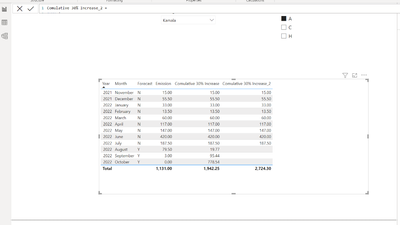
- Mark as New
- Bookmark
- Subscribe
- Mute
- Subscribe to RSS Feed
- Permalink
- Report Inappropriate Content
- Mark as New
- Bookmark
- Subscribe
- Mute
- Subscribe to RSS Feed
- Permalink
- Report Inappropriate Content
Hi @sam_hoccane
well, it wasn't easy. Please refer to the sample file wit the solution https://www.dropbox.com/t/cEbymwCwrT06CJz6
Comulative 30% Increase =
SUMX (
    VALUES ( data[Year_Month] ),
    CALCULATE (
        VAR Percentage = 0.3
        VAR CurrentDate = MAX (  data[Date] )
        VAR CurrentForecast = SELECTEDVALUE ( data[Forecast] )
        VAR CurrentEmission = SUM ( data[Emission] )
        VAR SummaryTable =
            CALCULATETABLE (
                SUMMARIZE (
                    Data,
                    data[Year_Month],
                    "@Date", MAX ( data[Date] ),
                    "@Forcast", SELECTEDVALUE ( data[Forecast] ),
                    "@Emission", SUM ( data[Emission] )
                ),
                ALL ( data )
            )
        VAR NTable = FILTER ( SummaryTable, [@Forcast] = "N" )
        VAR YTable = FILTER ( SummaryTable, [@Forcast] = "Y" )
        VAR Last2NRecords = TOPN ( 2, NTable, [@Date] )
        VAR PenultimateNDate = MINX ( Last2NRecords, [@Date] )
        VAR PenultimateNEmission= MINX ( FILTER ( Last2NRecords, [@Date] = PenultimateNDate ), [@Emission] )
        VAR YTableBefore = FILTER ( YTable, [@Date] < CurrentDate )
        VAR Result =
            IF (
                CurrentForecast = "N",
                CurrentEmission,
                PenultimateNEmission * POWER ( 1 + Percentage, COUNTROWS ( YTableBefore ) )
            )
        RETURN
            Result
    )
)- Mark as New
- Bookmark
- Subscribe
- Mute
- Subscribe to RSS Feed
- Permalink
- Report Inappropriate Content
@tamerj1 : Thankyou so much for helping me in this...
Last question if use slicer of Manager and Travel Source on measure, it is not giving desired results. how can I manuplate the above masure to satisfy this condition.

Many Thanks,

Helpful resources

Data Days 2026
Don't miss out on Data Days, June 15 through August 7. Learn Fabric, Power BI, SQL, AI and more.

Power BI DataViz World Championships - June 2026
A new Power BI DataViz World Championship is coming this June! Don't miss out on submitting your entry.

| User | Count |
|---|---|
| 2 | |
| 2 | |
| 1 | |
| 1 | |
| 1 |


