Hi,
I am wondering if it is possible to create a dynamic table with multiple columns.
I am looking to generate a table for historical data view ranges, a mix of static values and previous years, combined with a calculated sort order.
For Example:
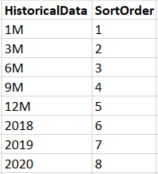
I can create the first column with:
Historical Data = UNION(DATATABLE("HistoricalData",STRING,{{"1M"},{"3M"},{"6M"},{"9M"},{"12M"}}),distinct(Dates[Year]))
And I typically create the second field with:
SortOrder = GENERATESERIES(1,5 + DISTINCTCOUNT(Dates[Year]))
However, I keep getting error when I try to generate a table with both columns together. I also run into errors if I create a table with just one of the columns and then try to add a calculated column using the second formula (it doesn't matter if HistoricalData or SortOrder if creeated first or not - they just dont like to be with each other...)
As can be seen from above, I want five static values to be able to filter on a rolling basis, plus the potential to start from a previous year, which is set to update when a new year arrives. I need the SortOrder as the default sort is alphabetical - I essentially just want the order in which they are in the table.
Any ideas?


