cancel
Showing results for 
Search instead for 
Did you mean: 

Get Fabric certified for FREE! Don't miss your chance! Learn more

Reply
jaws2k
Frequent Visitor

Calculated Dynamic Table with multiple columns

Hi,


I am wondering if it is possible to create a dynamic table with multiple columns.


I am looking to generate a table for historical data view ranges, a mix of static values and previous years, combined with a calculated sort order.


For Example:
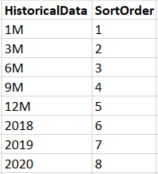
Calculated Table.png


I can create the first column with:

Historical Data = UNION(DATATABLE("HistoricalData",STRING,{{"1M"},{"3M"},{"6M"},{"9M"},{"12M"}}),distinct(Dates[Year]))


And I typically create the second field with:

SortOrder = GENERATESERIES(1,5 + DISTINCTCOUNT(Dates[Year]))
 
However, I keep getting error when I try to generate a table with both columns together. I also run into errors if I create a table with just one of the columns and then try to add a calculated column using the second formula (it doesn't matter if HistoricalData or SortOrder if creeated first or not - they just dont like to be with each other...)
 
As can be seen from above, I want five static values to be able to filter on a rolling basis, plus the potential to start from a previous year, which is set to update when a new year arrives. I need the SortOrder as the default sort is alphabetical - I essentially just want the order in which they are in the table.
 
Any ideas?
1 ACCEPTED SOLUTION
sturlaws
Resident Rockstar
Resident Rockstar

Hi,


I think I got this code to work:

Historical data =
VAR _minYear =
    MIN ( vDate[Year] )
RETURN
    UNION (
        DATATABLE (
            "HistoricalData"; STRING;
            "Sort"; INTEGER;
            {
                { "1M"; 1 };
                { "3M"; 2 };
                { "6M"; 3 };
                { "9M"; 4 };
                { "12M"; 5 }
            }
        );
        ADDCOLUMNS ( DISTINCT ( vDate[Year] ); "Sort"; vDate[Year] - _minYear + 6 )
    )

Cheers,

S

View solution in original post

2 REPLIES 2
sturlaws
Resident Rockstar
Resident Rockstar

Hi,


I think I got this code to work:

Historical data =
VAR _minYear =
    MIN ( vDate[Year] )
RETURN
    UNION (
        DATATABLE (
            "HistoricalData"; STRING;
            "Sort"; INTEGER;
            {
                { "1M"; 1 };
                { "3M"; 2 };
                { "6M"; 3 };
                { "9M"; 4 };
                { "12M"; 5 }
            }
        );
        ADDCOLUMNS ( DISTINCT ( vDate[Year] ); "Sort"; vDate[Year] - _minYear + 6 )
    )

Cheers,

S

Thanks @sturlaws , that works perfectly.

Helpful resources

Announcements
Join our Fabric User Panel

Join our Fabric User Panel

Share feedback directly with Fabric product managers, participate in targeted research studies and influence the Fabric roadmap.

January Power BI Update Carousel

Power BI Monthly Update - January 2026

Check out the January 2026 Power BI update to learn about new features.

FabCon Atlanta 2026 carousel

FabCon Atlanta 2026

Join us at FabCon Atlanta, March 16-20, for the ultimate Fabric, Power BI, AI and SQL community-led event. Save $200 with code FABCOMM.