Hi PowerBi Friends,
I have a table with TopN based on two different tables and I used crossjoin function to get its rank.
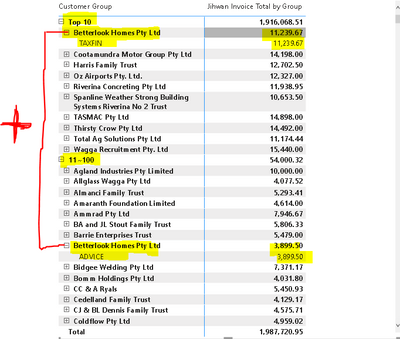
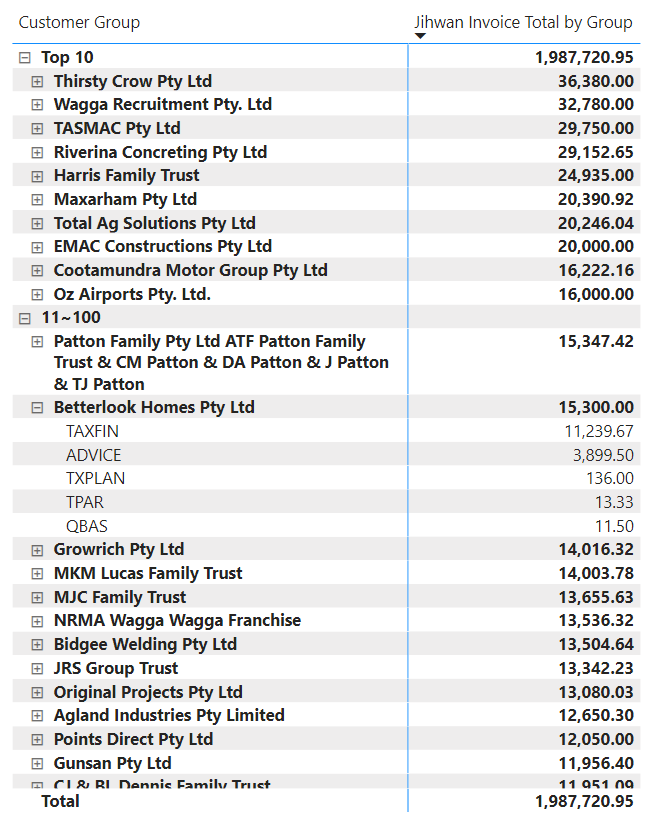
Now, I would like to combine/add things together that have the same entity/name.
As you can see here on the snapshot, I have the same group name but lies on a different TopN group and I wanted to combine or add this together so that it will be on its rightful TopN. Attached is my pbix file and the measures that I used. Appreciated your time doings this. Thanks!
https://www.dropbox.com/s/xszrjtxt9oo8k76/sampledata.pbix?dl=0
Jihwan Invoice Total by Group =
SUMX (
    KEEPFILTERS (
        FILTER (
        ALLSELECTED(FactFinalisedInvoicesDetailed[Invoice Type] ),
            COUNTROWS (
                FILTER (
                    'Customer Rank',
                    [Jihwan Rank by Invoice Type] >= 'Customer Rank'[Min Rank]
                        && [Jihwan Rank by Invoice Type] <= 'Customer Rank'[Max Rank]
                )
            ) > 0
        )
    ),
    [Total Invoice]
)
This is the rankx between two different tables.
Jihwan Rank by Invoice Type =
RANKX(CROSSJOIN(ALL(FactFinalisedInvoicesDetailed[Invoice Type]) ,ALL(GroupedFinalisedInvoices[Group Owner]) ), [Total Invoice], , DESC)