cancel
Showing results for 
Search instead for 
Did you mean: 

The Power BI Data Visualization World Championships is back! Get ahead of the game and start preparing now! Learn more

Reply
rbalza
Helper III
Helper III

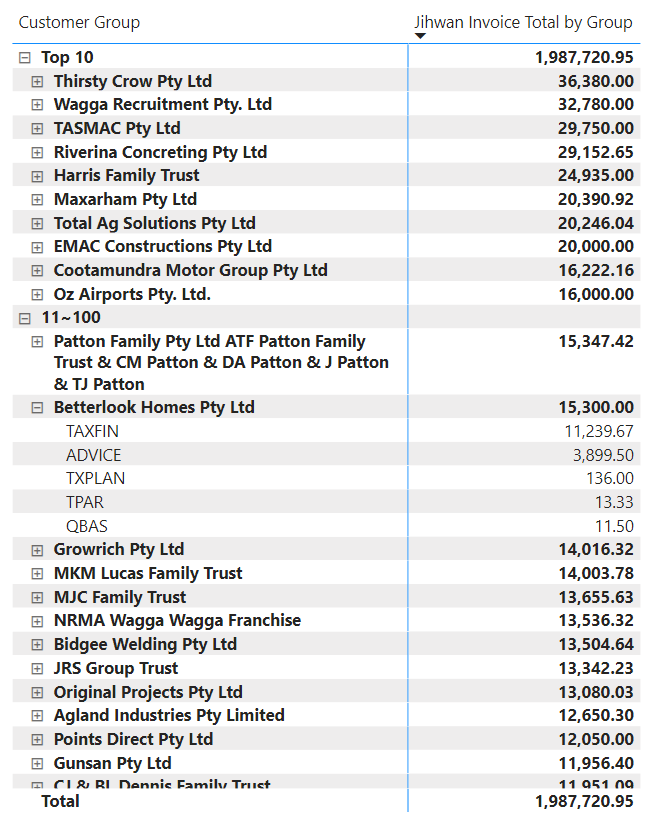
CALCULATE SUM based on TopN

Hi PowerBi Friends,


I have a table with TopN based on two different tables and I used crossjoin function to get its rank.
Now, I would like to combine/add things together that have the same entity/name. 

As you can see here on the snapshot, I have the same group name but lies on a different TopN group and I wanted to combine or add this together so that it will be on its rightful TopN. Attached is my pbix file and the measures that I used. Appreciated your time doings this. Thanks!

https://www.dropbox.com/s/xszrjtxt9oo8k76/sampledata.pbix?dl=0


Jihwan Invoice Total by Group = 
SUMX (
    KEEPFILTERS (
        FILTER (
        ALLSELECTED(FactFinalisedInvoicesDetailed[Invoice Type] ),
            COUNTROWS (
                FILTER (
                    'Customer Rank',
                    [Jihwan Rank by Invoice Type] >= 'Customer Rank'[Min Rank]
                        && [Jihwan Rank by Invoice Type] <= 'Customer Rank'[Max Rank]
                )
            ) > 0
        )
    ),
    [Total Invoice]
)

This is the rankx between two different tables.

Jihwan Rank by Invoice Type = 
RANKX(CROSSJOIN(ALL(FactFinalisedInvoicesDetailed[Invoice Type]) ,ALL(GroupedFinalisedInvoices[Group Owner]) ), [Total Invoice], , DESC)
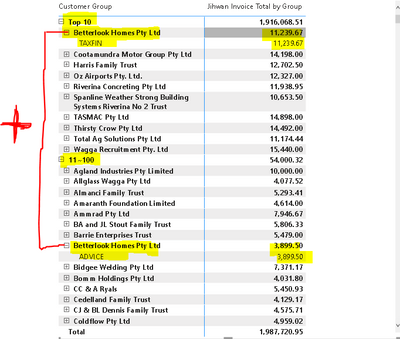
rbalza_1-1620160434662.png


1 ACCEPTED SOLUTION
AlexisOlson
Super User
Super User

If I'm understanding correctly, you want to rank by Group Owner so you should leave out the CROSSJOIN.


Jihwan Rank by Invoice Type =
RANKX (
    ALL ( GroupedFinalisedInvoices[Group Owner] ),
    CALCULATE ( [Total Invoice], ALLSELECTED ( FactFinalisedInvoicesDetailed ) ),
    ,
    DESC
)


AlexisOlson_0-1620163957600.png


View solution in original post

3 REPLIES 3
AlexisOlson
Super User
Super User

If I'm understanding correctly, you want to rank by Group Owner so you should leave out the CROSSJOIN.


Jihwan Rank by Invoice Type =
RANKX (
    ALL ( GroupedFinalisedInvoices[Group Owner] ),
    CALCULATE ( [Total Invoice], ALLSELECTED ( FactFinalisedInvoicesDetailed ) ),
    ,
    DESC
)


AlexisOlson_0-1620163957600.png


@AlexisOlson works like a charm. This arises me on another concern 🙂 If you don't mind to have a look at it?  Thanks very much for your time taking this. Cheers!


https://community.powerbi.com/t5/DAX-Commands-and-Tips/Incorrect-sum-and-average-display-count-and-a... 

Oh wow @AlexisOlson .. thats freakin on point. Will have to try this and let you know the result. Cheers!

Helpful resources

Announcements
November Power BI Update Carousel

Power BI Monthly Update - November 2025

Check out the November 2025 Power BI update to learn about new features.

Fabric Data Days Carousel

Fabric Data Days

Advance your Data & AI career with 50 days of live learning, contests, hands-on challenges, study groups & certifications and more!

FabCon Atlanta 2026 carousel

FabCon Atlanta 2026

Join us at FabCon Atlanta, March 16-20, for the ultimate Fabric, Power BI, AI and SQL community-led event. Save $200 with code FABCOMM.