cancel
Showing results for 
Search instead for 
Did you mean: 

The Power BI Data Visualization World Championships is back! Get ahead of the game and start preparing now! Learn more

Reply
Rpxx
Regular Visitor

Average basket size containing SKU's

I have a table with ordered SKU's. One line is a one position on one order. In one order client can buy many different SKU's. I'd like to calculate and analize average basket size (value) included next SKU's. Could you help me?


For example for SKU 01111 it will be (order 001) SUM=6; (order 003)  SUM=16, so avg order is (16+6)/2=11


Date| No of order| SKU| Value
2022-12-01| 001| 02222| 2
2022-12-01| 001| 01111| 4
2022-12-01| 002| 02222| 10
2022-12-01| 003| 02222| 3
2022-12-01| 003| 04444| 2
2022-12-01| 003| 06666| 9
2022-12-01| 003| 01111| 2
2022-12-02| 004| 02222| 4
2022-12-02| 005| 03333| 2
2022-12-02| 005| 04444| 7
2022-12-02| 005| 01111| 4
2022-12-02| 006| 05555| 7


SKU| Avg basket size with SKU
011111| 11
022222| ?
1 ACCEPTED SOLUTION
Anonymous
Not applicable

Hi  @Rpxx ,


Here are the steps you can follow:

1. Create measure.

Avg basket size with SKU =
var _column=SELECTCOLUMNS(FILTER(ALL('Table'),'Table'[Date]=MAX('Table'[Date])&&'Table'[SKU]=MAX('Table'[SKU])),"1",[No of order])
var _count=
CALCULATE(DISTINCTCOUNT('Table'[No of order]),FILTER(ALL('Table'),
'Table'[SKU]=MAX('Table'[SKU])&&'Table'[Date]=MAX('Table'[Date])))
var _sum=
SUMX(FILTER(ALL('Table'),'Table'[No of order] in _column&&'Table'[Date]=MAX('Table'[Date])),[Value])
return
DIVIDE(_sum,_count)

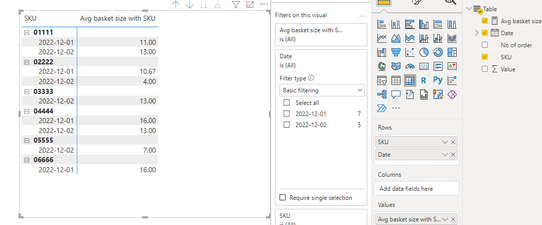
2. Result:

vyangliumsft_0-1670549632093.png


Best Regards,

Liu Yang

If this post helps, then please consider Accept it as the solution to help the other members find it more quickly

View solution in original post

3 REPLIES 3
Anonymous
Not applicable

Hi  @Rpxx ,


Here are the steps you can follow:

1. Create measure.

Avg basket size with SKU =
var _column=SELECTCOLUMNS(FILTER(ALL('Table'),'Table'[Date]=MAX('Table'[Date])&&'Table'[SKU]=MAX('Table'[SKU])),"1",[No of order])
var _count=
CALCULATE(DISTINCTCOUNT('Table'[No of order]),FILTER(ALL('Table'),
'Table'[SKU]=MAX('Table'[SKU])&&'Table'[Date]=MAX('Table'[Date])))
var _sum=
SUMX(FILTER(ALL('Table'),'Table'[No of order] in _column&&'Table'[Date]=MAX('Table'[Date])),[Value])
return
DIVIDE(_sum,_count)

2. Result:

vyangliumsft_0-1670549632093.png


Best Regards,

Liu Yang

If this post helps, then please consider Accept it as the solution to help the other members find it more quickly

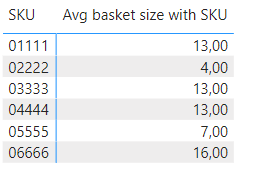
This is my expected result. Could you help me? Date is not important...

Rpxx_1-1671449249955.png


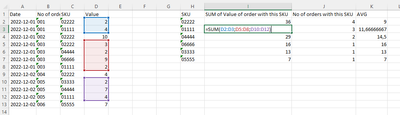
Could you describe what is the next steps to calculate these numbers in your file? I don't understand...

Rpxx_0-1671443642486.png


Helpful resources

Announcements
Power BI DataViz World Championships

Power BI Dataviz World Championships

The Power BI Data Visualization World Championships is back! Get ahead of the game and start preparing now!

November Power BI Update Carousel

Power BI Monthly Update - November 2025

Check out the November 2025 Power BI update to learn about new features.

FabCon Atlanta 2026 carousel

FabCon Atlanta 2026

Join us at FabCon Atlanta, March 16-20, for the ultimate Fabric, Power BI, AI and SQL community-led event. Save $200 with code FABCOMM.