Hello all, I'm new to Power BI and I'm having a problem developing visuals that DON'T aggregate my data.
I have HR risk data for several teams. For each team, I want to develop a visual like this:
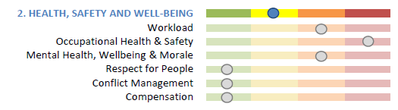
Green = 1; Yellow = 2, etc.
In power BI, I'm trying to use the horizontal bar graph, but I can't get the different indicators to be separate columns. Instead I get either a total result (summing up all categories into one bar), or the visual just stays blank. I've tried looking through tutorial videos, but none of the ones I found work with individual data points but instead use Power BI to aggregrate spending or sales totals.
This is likely a very basic question, but I don't know how to get past it. Any help would be greatly appreciated.
EDIT JULY 18: Found this tuturial which addresses my issue. https://www.youtube.com/watch?v=2ClAphW9usY


