Join us at FabCon Atlanta from March 16 - 20, 2026, for the ultimate Fabric, Power BI, AI and SQL community-led event. Save $200 with code FABCOMM.
Register now!Vote for your favorite vizzies from the Power BI Dataviz World Championship submissions. Vote now!
Hello all, I'm new to Power BI and I'm having a problem developing visuals that DON'T aggregate my data.
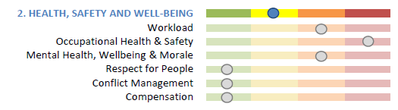
I have HR risk data for several teams. For each team, I want to develop a visual like this:
Green = 1; Yellow = 2, etc.
In power BI, I'm trying to use the horizontal bar graph, but I can't get the different indicators to be separate columns. Instead I get either a total result (summing up all categories into one bar), or the visual just stays blank. I've tried looking through tutorial videos, but none of the ones I found work with individual data points but instead use Power BI to aggregrate spending or sales totals.
This is likely a very basic question, but I don't know how to get past it. Any help would be greatly appreciated.
EDIT JULY 18: Found this tuturial which addresses my issue. https://www.youtube.com/watch?v=2ClAphW9usY
If you want to use the standard bar chart visual you will need to add a lot of code and placeholders . Might be easier to use a custom visual for this.
If you love stickers, then you will definitely want to check out our Community Sticker Challenge!
Check out the January 2026 Power BI update to learn about new features.