cancel
Showing results for 
Search instead for 
Did you mean: 

Data Days is here! Join us now for 60+ days of learning, challenges, and connection. Learn more

Reply
SaladDressing
New Member

undefined

Hello all, I'm new to Power BI and I'm having a problem developing visuals that DON'T aggregate my data.

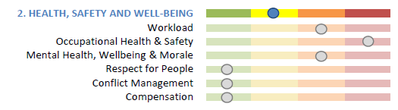
I have HR risk data for several teams. For each team, I want to develop a visual like this:

HR Example.PNG


Green = 1; Yellow = 2, etc.

In power BI, I'm trying to use the horizontal bar graph, but I can't get the different indicators to be separate columns. Instead I get either a total result (summing up all categories into one bar), or the visual just stays blank. I've tried looking through tutorial videos, but none of the ones I found work with individual data points but instead use Power BI to aggregrate spending or sales totals.

This is likely a very basic question, but I don't know how to get past it. Any help would be greatly appreciated.

EDIT JULY 18: Found this tuturial which addresses my issue. https://www.youtube.com/watch?v=2ClAphW9usY

1 REPLY 1
lbendlin
Super User
Super User

If you want to use the standard bar chart visual you will need to add a lot of code and placeholders . Might be easier to use a custom visual for this.

Helpful resources

Announcements
Fabric Data Days is here Carousel

Fabric Data Days 2026

Don't miss out on Data Days, June 15 through August 7. Learn Fabric, Power BI, SQL, AI and more.

May Power BI Update Carousel

Power BI Monthly Update - May 2026

Check out the May 2026 Power BI update to learn about new features.

Power BI DataViz World Championships carousel

Power BI DataViz World Championships - June 2026

A new Power BI DataViz World Championship is coming this June! Don't miss out on submitting your entry.

Top Solution Authors