This time we’re going bigger than ever. Fabric, Power BI, SQL, AI and more. We're covering it all. You won't want to miss it.
Learn moreDid you hear? There's a new SQL AI Developer certification (DP-800). Start preparing now and be one of the first to get certified. Register now
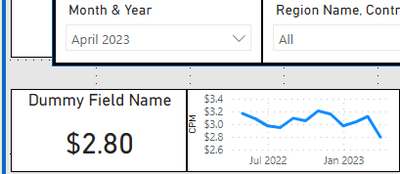
In the below scenario Month & Year is from a Date table joined on Date to my Fact table.
I need the measure from fact table to show only the selected month value on the left card (April 2023, working properly), but I also need the graphic to show all dates/months prior to and including April 2023.
Currently visual interactions are turned off with the graph, so I can't use any logic to isolate that April 2023 is currently selected to end the display date range. It needs to end with the selected date value for whatever month is selected.
If I turn on visual interactions it will break the range displayed and only show a single month.
Any clue how to get around this??
You need to use another, disconnected dates table for the x axis of your chart, and a measure for the value (returning BLANK() after the selected date)
Check out the April 2026 Power BI update to learn about new features.
Sign up to receive a private message when registration opens and key events begin.
If you have recently started exploring Fabric, we'd love to hear how it's going. Your feedback can help with product improvements.