cancel
Showing results for 
Search instead for 
Did you mean: 

We've captured the moments from FabCon & SQLCon that everyone is talking about, and we are bringing them to the community, live and on-demand. Starts on April 14th. Register now

Reply
Anonymous
Not applicable

Visual Interactions, multiple parameters

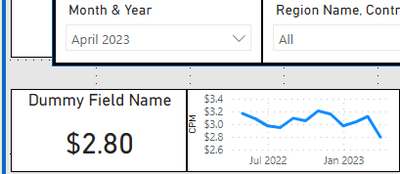
In the below scenario Month & Year is from a Date table joined on Date to my Fact table.


I need the measure from fact table to show only the selected month value on the left card (April 2023, working properly), but I also need the graphic to show all dates/months prior to and including April 2023.


Sethj33_0-1683147788223.png


Currently visual interactions are turned off with the graph, so I can't use any logic to isolate that April 2023 is currently selected to end the display date range. It needs to end with the selected date value for whatever month is selected.


If I turn on visual interactions it will break the range displayed and only show a single month. 


Any clue how to get around this??


1 REPLY 1
lbendlin
Super User
Super User

You need to use another, disconnected dates table for the x axis of your chart, and a measure for the value (returning BLANK() after the selected date)

Helpful resources

Announcements
New to Fabric survey Carousel

New to Fabric Survey

If you have recently started exploring Fabric, we'd love to hear how it's going. Your feedback can help with product improvements.

Power BI DataViz World Championships carousel

Power BI DataViz World Championships - June 2026

A new Power BI DataViz World Championship is coming this June! Don't miss out on submitting your entry.

Join our Fabric User Panel

Join our Fabric User Panel

Share feedback directly with Fabric product managers, participate in targeted research studies and influence the Fabric roadmap.

March Power BI Update Carousel

Power BI Community Update - March 2026

Check out the March 2026 Power BI update to learn about new features.

Top Solution Authors