
cancel
Showing results for 
Search instead for 
Did you mean: 

Learn from the best! Meet the four finalists headed to the FINALS of the Power BI Dataviz World Championships! Register now

Reply
khue98
Frequent Visitor

Disable table visualization's order

hi, i have an excel table like this:

Metrics       Figures

Loan              12

Provision        3

Write-offs      1.5

Net losses      2


I want my table visual to look exactly the same as in the above table. However, PB automatically sort the table based on the Metrics column. The output looks like this:

Metrics       Figures

Loan              ...

Net losses     ...

Provision       ...

Write-offs     ...


How may I fix this issue? Thank you in advance!

1 REPLY 1
Daryl-Lynch-Bzy
Community Champion
Community Champion

Hi @khue98 

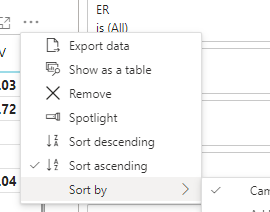
In the top right corner of the visual in the ... options is where the default sort order can be set.  There is the option to base the sorting on the dimension or the measure. 

DarylLynchBzy_0-1660925088762.png


Please note your metrics are conveniently sorted A-Z.  If you want to change to non-A-Z order you need to add a Sort Key and then set the "Sort by Column" option.  Sort one column by another column in Power BI - Power BI | Microsoft Docs

DarylLynchBzy_1-1660925242792.png


Helpful resources

Announcements
Join our Fabric User Panel

Join our Fabric User Panel

Share feedback directly with Fabric product managers, participate in targeted research studies and influence the Fabric roadmap.

February Power BI Update Carousel

Power BI Monthly Update - February 2026

Check out the February 2026 Power BI update to learn about new features.

FabCon Atlanta 2026 carousel

FabCon Atlanta 2026

Join us at FabCon Atlanta, March 16-20, for the ultimate Fabric, Power BI, AI and SQL community-led event. Save $200 with code FABCOMM.

Top Solution Authors
Top Kudoed Authors