Don't miss your chance to take the Fabric Data Engineer (DP-600) exam for FREE! Find out how by watching the DP-600 session on-demand now through April 28th.
Learn moreJoin the FabCon + SQLCon recap series. Up next: Power BI, Real-Time Intelligence, IQ and AI, and Data Factory take center stage. All sessions are available on-demand after the live show. Register now
Hello,
I've been asked to show a graphic in a report that has up and down arrows to show the change from quarter to quarter. I'm fairly new to PBI and have looked at lots of the replies online etc. but I can't get the to work as I think they should.
If I was working in Excel, I would use an IF Function, if this is > than that, Red.
The data I am working with is a specific count of something, there is no working out a percentage of a target number, it is either more than, or less than, the number in the previous month, an example below.
| Colour | Q1 | Q2 |
| Pink | 9 | 9 |
| Yellow | 8 | 14 |
| Blue | 27 | 51 |
| Green | 8 | 2 |
| Red | 5 | 0 |
| Orange | 0 | 3 |
Please can anyone help?
Many thanks,
Lozza
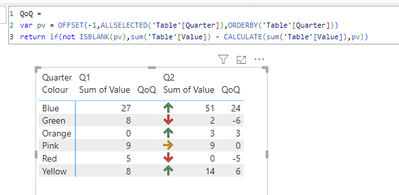
what would the expected outcome look like based on your sample data?
| Colour | Q1 | Q2 | |
| Pink | 9 | 9 | = |
| Yellow | 8 | 14 | up arrow |
| Blue | 27 | 51 | up arrow |
| Green | 8 | 2 | down arrow |
| Red | 5 | 0 | down arrow |
| Orange | 0 | 3 | up arrow |
Either up and down arrows and an equals sign, or a colour coded symbol (red for down, yellow for equals, green for up)?
Thank you for looking at this for me.
Check out the April 2026 Power BI update to learn about new features.
If you have recently started exploring Fabric, we'd love to hear how it's going. Your feedback can help with product improvements.
A new Power BI DataViz World Championship is coming this June! Don't miss out on submitting your entry.