Get certified for free when you join Fabric Data Days 2026 and dive into Fabric, Power BI, SQL, AI, and other essential data skills.
Join nowData Days is here! Join us now for 60+ days of learning, challenges, and connection. Learn more
Hello,
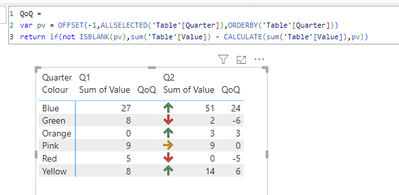
I've been asked to show a graphic in a report that has up and down arrows to show the change from quarter to quarter. I'm fairly new to PBI and have looked at lots of the replies online etc. but I can't get the to work as I think they should.
If I was working in Excel, I would use an IF Function, if this is > than that, Red.
The data I am working with is a specific count of something, there is no working out a percentage of a target number, it is either more than, or less than, the number in the previous month, an example below.
| Colour | Q1 | Q2 |
| Pink | 9 | 9 |
| Yellow | 8 | 14 |
| Blue | 27 | 51 |
| Green | 8 | 2 |
| Red | 5 | 0 |
| Orange | 0 | 3 |
Please can anyone help?
Many thanks,
Lozza
what would the expected outcome look like based on your sample data?
| Colour | Q1 | Q2 | |
| Pink | 9 | 9 | = |
| Yellow | 8 | 14 | up arrow |
| Blue | 27 | 51 | up arrow |
| Green | 8 | 2 | down arrow |
| Red | 5 | 0 | down arrow |
| Orange | 0 | 3 | up arrow |
Either up and down arrows and an equals sign, or a colour coded symbol (red for down, yellow for equals, green for up)?
Thank you for looking at this for me.
Don't miss out on Data Days, June 15 through August 7. Learn Fabric, Power BI, SQL, AI and more.
Check out the May 2026 Power BI update to learn about new features.
| User | Count |
|---|---|
| 1 | |
| 1 | |
| 1 | |
| 1 | |
| 1 |