This time we’re going bigger than ever. Fabric, Power BI, SQL, AI and more. We're covering it all. You won't want to miss it.
Learn moreDid you hear? There's a new SQL AI Developer certification (DP-800). Start preparing now and be one of the first to get certified. Register now
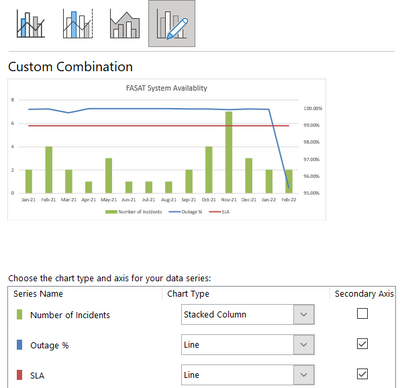
I am trying to replicate Excel report in Power BI and there is a a Combo chart with columns and two lines. I tried using line and clustered column visual in Power BI, but I am able to add only one line, not two. Is there any way to add multiple lines to the combo chart?
Solved! Go to Solution.
I'm not sure where you're running into trouble. You can definitely add multiple fields to the Line y-axis box.
Thank you very much! It worked, sorry for the delay in my reply.
I'm not sure where you're running into trouble. You can definitely add multiple fields to the Line y-axis box.
Curious why when switching from a 'Clustered Column' (values by all months and several years) to 'Line and Clustered Column' (drag the values field from Column Y-Axis into the Line Y-Axis), PBI adds together the values for all months and omits years?... calculation is set to 'no calculation' on the 'show value as'... really a strange thing that I can't get to resolve. Maybe because there's not a 'Line Y-Axis Legend' to drag years into... IDK.
Interestingly, when I drag the values field into the 'Small Multiples' field, the engine correctly infers year context, but unfortunately breaks each year into a separate mini-chart for each year.
If I switch to the chart type of 'Line Chart', the correct context is rendered there, too... but just need to get the column component, like in Excel with the 'Combo Chart' option (tangent/venting: the PBI team should have Combo Chart in this software, IMO... MS Office products should leverage continuity between apps whenever possible, especially from Excel into PBI).
For what it's worth, I believe the issue with not having multiple lines work automatically is that there isn't a 'Line Legend', but there is for columns. So it appears if you want separate lines for each year, you have to write a different formula filtering for each year.
Excel is so much more customizable.
Check out the April 2026 Power BI update to learn about new features.
Sign up to receive a private message when registration opens and key events begin.
If you have recently started exploring Fabric, we'd love to hear how it's going. Your feedback can help with product improvements.