cancel
Showing results for 
Search instead for 
Did you mean: 

Get Fabric Certified for FREE during Fabric Data Days. Don't miss your chance! Request now

Reply
rammy
Helper I
Helper I

why date is not reflected in power bi services

Hi, Power bi family 


I am facing a problem , which is i feel difficult , so please help me in this .


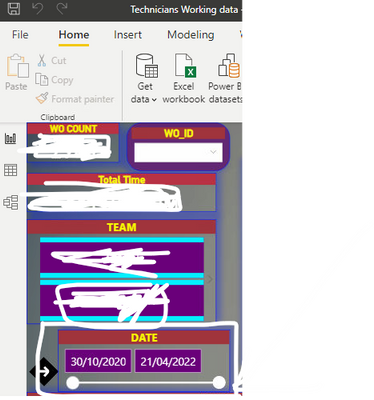
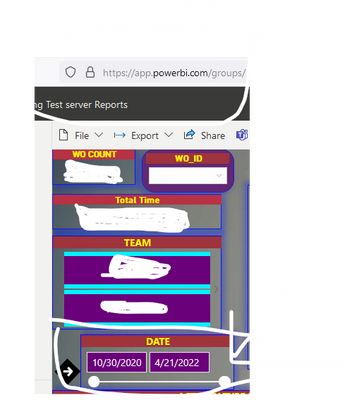
Here power bi desktop date shows as per my requirement likr (dd\mm\yy) But when i am going to power bi service the date format reflects (mm\dd\yy)

can any one tell me what happend , what type of things that i need to change 


please help me in this, 

Thanks for your response 

Kind regards 


power bi desktop image


rammy_0-1651555576868.png


online service image


rammy_2-1651555704904.png


1 ACCEPTED SOLUTION
Anonymous
Not applicable

Hi @rammy ,


Please refer this blog to change the date format in Power BI Service.

https://nform.com.au/how-to-change-the-date-format-in-the-power-bi-service/ 


Best Regards,

Jay

View solution in original post

2 REPLIES 2
Anonymous
Not applicable

Hi @rammy ,


Please refer this blog to change the date format in Power BI Service.

https://nform.com.au/how-to-change-the-date-format-in-the-power-bi-service/ 


Best Regards,

Jay

lbendlin
Super User
Super User

The Power BI service infers the locale settings from the user's browser locale.

Helpful resources

Announcements
November Power BI Update Carousel

Power BI Monthly Update - November 2025

Check out the November 2025 Power BI update to learn about new features.

Fabric Data Days Carousel

Fabric Data Days

Advance your Data & AI career with 50 days of live learning, contests, hands-on challenges, study groups & certifications and more!

FabCon Atlanta 2026 carousel

FabCon Atlanta 2026

Join us at FabCon Atlanta, March 16-20, for the ultimate Fabric, Power BI, AI and SQL community-led event. Save $200 with code FABCOMM.

Top Solution Authors
Top Kudoed Authors