
cancel
Showing results for 
Search instead for 
Did you mean: 

Get Fabric Certified for FREE during Fabric Data Days. Don't miss your chance! Request now

Reply
jatneerjat
Helper V
Helper V

visuals are loading very slow in power bi

Hi,

@Greg_Deckler @Seth_C_Bauer @Anonymous


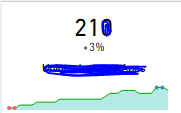
I have a power BI report in which i am fetching data through analysis services and for that i have created measures in analysis service.Now there are some 5 'card with states' visuals which takes time while loading so what could be the reason for slow visual load ?how can i make it to load fast?


1.PNG 


Sometimes this visuals(Line Chart) also took time to load


2.PNG


Thanks

3 REPLIES 3
Seth_C_Bauer
Community Champion
Community Champion

@jatneerjat Are you using Direct Query in your AS model? Do you have issues in both the Desktop and the Service?


Looking for more Power BI tips, tricks & tools? Check out PowerBI.tips the site I co-own with Mike Carlo. Also, if you are near SE WI? Join our PUG Milwaukee Brew City PUG

Hi @Seth_C_Bauer


I am using direct query.

Yes the issue persist in both pbix and service but in service it usually takes longer than desktop.

it takes around 2 to 3 mins sometimes 5 minutes for some cards.


and the measures i am using in cards are:


AvgVal:= IF(HASONEVALUE(Table1[Id])
,SWITCH(VALUES(Table1[Id])
,1,[AvgColumn1]
,2,[AvgColumn2]
,3,[AvgColumn3]
)
)


AvgColumn1:= AVERAGEX(
KEEPFILTERS(VALUES('viewUser1'[UId])),
CALCULATE(DISTINCTCOUNT('viewApp1'[ApplicationId]))


AvgColumn2:= AVERAGEX(
KEEPFILTERS(VALUES('viewUser2'[UId])),
CALCULATE(DISTINCTCOUNT('viewApp2'[ApplicationId]))


AvgColumn3:= AVERAGEX(
KEEPFILTERS(VALUES('viewUser3'[UId])),
CALCULATE(DISTINCTCOUNT('viewApp3'[ApplicationId]))

@jatneerjat Direct Query is going to be the slowest possible connection. The performance issues will need to be mitigated on the database side... I would assume you need the most up to date information and that is why you are using that method. If not, I would recommend switching to Import.

If you need to stick to DQ, optimize the query, and reduce the amount of information if possible.

On top of that, you are doing row by row calcs here and those are going to be super slow.


Looking for more Power BI tips, tricks & tools? Check out PowerBI.tips the site I co-own with Mike Carlo. Also, if you are near SE WI? Join our PUG Milwaukee Brew City PUG

Helpful resources

Announcements
November Power BI Update Carousel

Power BI Monthly Update - November 2025

Check out the November 2025 Power BI update to learn about new features.

Fabric Data Days Carousel

Fabric Data Days

Advance your Data & AI career with 50 days of live learning, contests, hands-on challenges, study groups & certifications and more!

FabCon Atlanta 2026 carousel

FabCon Atlanta 2026

Join us at FabCon Atlanta, March 16-20, for the ultimate Fabric, Power BI, AI and SQL community-led event. Save $200 with code FABCOMM.

Top Solution Authors
Top Kudoed Authors