Join us at FabCon Atlanta from March 16 - 20, 2026, for the ultimate Fabric, Power BI, AI and SQL community-led event. Save $200 with code FABCOMM.
Register now!The Power BI Data Visualization World Championships is back! It's time to submit your entry. Live now!
Hello,
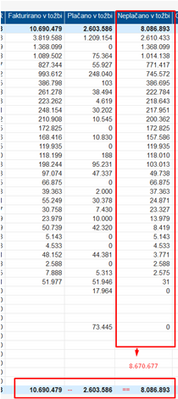
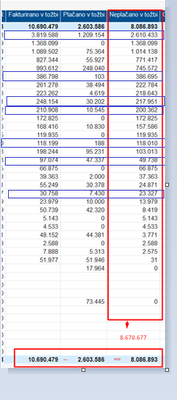
I have one question regarding dax, do you maybe know how I could calculate this to get the following
in a sum i like NEplačano 8670677 and not 8086893. I have a dax
Neplačano v tožbi:=IF([Plačano v tožbi]>[Fakturirano v tožbi],0,SUMX('receivables terjatve',[Fakturirano v tožbi]-[Plačano v tožbi]))
Solved! Go to Solution.
Hi @LeaRupnik
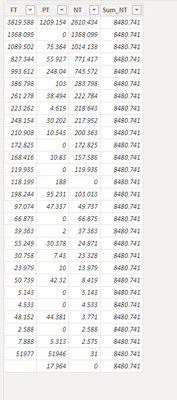
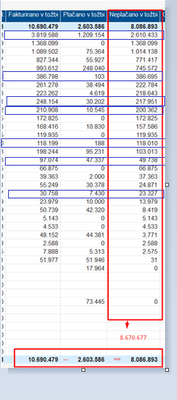
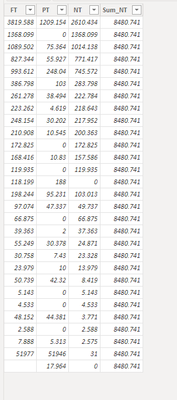
According to the data and requirements you provided, you can not get the calculation results you want, I found several inaccuracies in the picture, you can refer to the comparison chart I provided
Here is my computed column code
NT = IF('Table'[PT]>'Table'[FT],0,'Table'[FT]-'Table'[PT])
Sum_NT = SUM('Table'[NT])
Best Regards,
Yolo Zhu
If this post helps, then please consider Accept it as the solution to help the other members find it more quickly.
Hi @LeaRupnik
According to the data and requirements you provided, you can not get the calculation results you want, I found several inaccuracies in the picture, you can refer to the comparison chart I provided
Here is my computed column code
NT = IF('Table'[PT]>'Table'[FT],0,'Table'[FT]-'Table'[PT])
Sum_NT = SUM('Table'[NT])
Best Regards,
Yolo Zhu
If this post helps, then please consider Accept it as the solution to help the other members find it more quickly.
Hi @LeaRupnik
According to the data and requirements you provided, you can not get the calculation results you want, I found several inaccuracies in the picture, you can refer to the comparison chart I provided
Here is my computed column code
NT = IF('Table'[PT]>'Table'[FT],0,'Table'[FT]-'Table'[PT])
Sum_NT = SUM('Table'[NT])
Best Regards,
Yolo Zhu
If this post helps, then please consider Accept it as the solution to help the other members find it more quickly.
The Power BI Data Visualization World Championships is back! It's time to submit your entry.
Check out the January 2026 Power BI update to learn about new features.
| User | Count |
|---|---|
| 24 | |
| 13 | |
| 10 | |
| 7 | |
| 5 |