Join us at FabCon Atlanta from March 16 - 20, 2026, for the ultimate Fabric, Power BI, AI and SQL community-led event. Save $200 with code FABCOMM.
Register now!View all the Fabric Data Days sessions on demand. View schedule
I have a workspace and an associated app. In the workspace, there are nine reports, however, only eight of these appear in the app. As far as I can see, the settings on every report are identical. I think of no reason why this is happening. Has anyone had this problem before?
Solved! Go to Solution.
Hi @AndrewPF
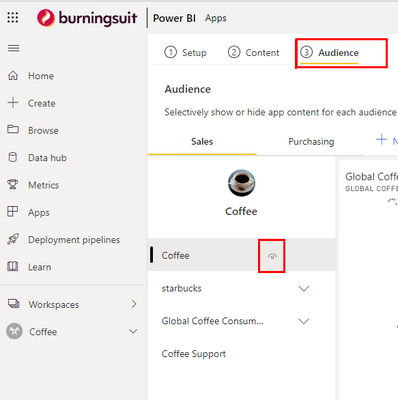
Check the settings via "Update App", on the (3) Audience tab, move your mouse over the navigation items on the left hand side, you see the Eye Icon pop up for each navigation item.
You'll need to check the eye symbol is "open" on the Report for each Audience you have created.
Once you've published an App, adding any content to it is added with the view turned off for all Audiences, you have to turn the new content on for whichever Audience is appropriate.
Hope this helps
Stuart
Hi @Burningsuit , I can't tell you how much this helped me!! I had been having the same issue where my new reports were not moving to the App (and even some that had already existing in the App suddenly disappearing when I Updated the App). I had been researching this issue for hours and just ran across this post and your response. Can't thank you enough!
Thanks Stuart... saved me some frustration 🙂
Thank you Stuart. I had clearly deselected it in error at some point in the past, but it's sorted now.
Hi @AndrewPF
Check the settings via "Update App", on the (3) Audience tab, move your mouse over the navigation items on the left hand side, you see the Eye Icon pop up for each navigation item.
You'll need to check the eye symbol is "open" on the Report for each Audience you have created.
Once you've published an App, adding any content to it is added with the view turned off for all Audiences, you have to turn the new content on for whichever Audience is appropriate.
Hope this helps
Stuart
Check out the November 2025 Power BI update to learn about new features.
Advance your Data & AI career with 50 days of live learning, contests, hands-on challenges, study groups & certifications and more!