cancel
Showing results for 
Search instead for 
Did you mean: 

The Power BI Data Visualization World Championships is back! Get ahead of the game and start preparing now! Learn more

Reply
Anonymous
Not applicable

remove wrong value from a filter?

I have the 'Edit' option in power BI service and I wanted to do a quick modification to a report.


I have a specific value in a filter for a Dimension that I want to remove.


(I know the correct fix would be to eliminate this wrong entry in the Dim table, but I don't have access to the source).


It's the DimProvince, and there is a row which is not a Province (this shows up in the filtering option): is there a quick way to not display that wrong value in the filter options?

1 ACCEPTED SOLUTION
ibarrau
Super User
Super User

Hi. Let's see if I understand. You have slicer filter in province and want to hide one of its values. In order to do that. Click on the slicer, and add a Visual Level Filter on the Filter Pane like province name. Then select all values and unmark the one you don't want to show up there.

Hope this helps,


If this post helps, then please consider Accept it as the solution to help the other members find it more quickly.

Happy to help!

LaDataWeb Blog

View solution in original post

4 REPLIES 4
Anonymous
Not applicable

Hi @Anonymous ,


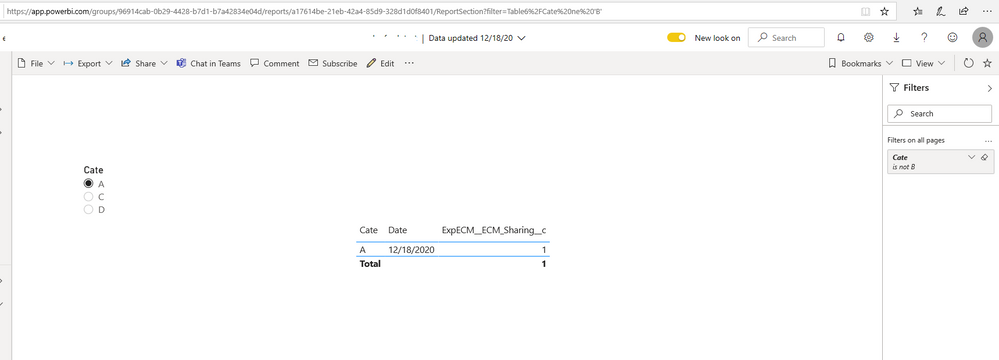
You could use URL filter to remove wrong value.

The basic syntax is fairly straightforward, as follows:

URL?filter=Table/Field ne 'value'

18.png19.png


Reference: Filter a report using query string parameters in the URL


Best Regards,

Stephen Tao


If this post helps, then please consider Accept it as the solution to help the other members find it more quickly.

PC2790
Community Champion
Community Champion

Hi @Anonymous ,


The ability of you to update the report totally depends on how the report was shared with you, whether or not the edit access was given to you.

Please look for the available filters in teh report and see if the relevant one is present for you to get rid of the unwanted values.

ibarrau
Super User
Super User

Hi. Let's see if I understand. You have slicer filter in province and want to hide one of its values. In order to do that. Click on the slicer, and add a Visual Level Filter on the Filter Pane like province name. Then select all values and unmark the one you don't want to show up there.

Hope this helps,


If this post helps, then please consider Accept it as the solution to help the other members find it more quickly.

Happy to help!

LaDataWeb Blog

Anonymous
Not applicable

Thanks, not sure if it is a "add a Visual Level Filter" I added a 'Filter on all pages' in the filter seciton and that worked...

Helpful resources

Announcements
Power BI DataViz World Championships

Power BI Dataviz World Championships

The Power BI Data Visualization World Championships is back! Get ahead of the game and start preparing now!

December 2025 Power BI Update Carousel

Power BI Monthly Update - December 2025

Check out the December 2025 Power BI Holiday Recap!

FabCon Atlanta 2026 carousel

FabCon Atlanta 2026

Join us at FabCon Atlanta, March 16-20, for the ultimate Fabric, Power BI, AI and SQL community-led event. Save $200 with code FABCOMM.