cancel
Showing results for 
Search instead for 
Did you mean: 

Did you hear? There's a new SQL AI Developer certification (DP-800). Start preparing now and be one of the first to get certified. Register now

Reply
YuanG
Helper I
Helper I

plus zeros

Hello,


It's a problem i've just found and the first time i've met, In the chart of my report and in dashbord, all the data in format % had a leading zero in plus

plus zero error 1.pngthis is a chart in a report


And this is from my dashbord

plus zero error 2.png


But they were all good in my desktop report without leading zero.

And i try to refresh or re-update my report, none of them works.


Anyone has a idea of this problem?Is this some mistake i've made in my report, or just a error?


Thanks in advance!


7 REPLIES 7
Eric_Zhang
Microsoft Employee
Microsoft Employee

@YuanG


I don't reproduce that behavior in my test. Could you share the pbix? You can upload it to any webstorage such as OneNote, dorpbox. Do mask sensitive data before uploading.

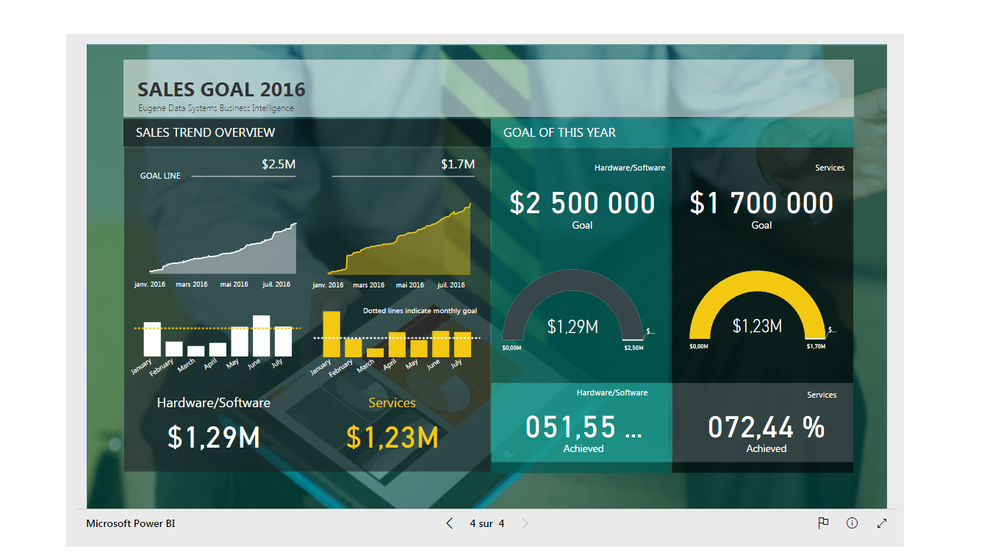
@Eric_Zhang   Thank you for the response, but i can't upload my pbix, and i found this same problem in a report of data gallery.  http://community.powerbi.com/t5/Data-Stories-Gallery/Business-Sales-Report-PowerBI/m-p/60491   in the page 4, the % of achived

Eric_Zhang
Microsoft Employee
Microsoft Employee

@YuanG


The % of achieved shows as below in my PC. I don't see leading 0. Smiley Frustrated


Capture.PNG

@Eric_Zhang    That's so weird! This is what i saw in this page.

leading zero prob.png


Eric_Zhang
Microsoft Employee
Microsoft Employee

@YuanG


Have you tried to open it in another browser or in another PC?

@Eric_Zhang  Is that maybe a problem show in different version of language i guess? Beacuse i noticed in the same page of the report of data gallery, the format of the number of GOAL OF THIS YEAR were different.  btw I use a french version.

@Eric_Zhang  Yes, i've try with different brower and PC, also different account of PowerBI.  And after the update of august, the leading zero problem even appear in my pibx file.Smiley Mad

Helpful resources

Announcements
April Power BI Update Carousel

Power BI Monthly Update - April 2026

Check out the April 2026 Power BI update to learn about new features.

Fabric SQL PBI Data Days

Data Days 2026 coming soon!

Sign up to receive a private message when registration opens and key events begin.

New to Fabric survey Carousel

New to Fabric Survey

If you have recently started exploring Fabric, we'd love to hear how it's going. Your feedback can help with product improvements.

Power BI DataViz World Championships carousel

Power BI DataViz World Championships - June 2026

A new Power BI DataViz World Championship is coming this June! Don't miss out on submitting your entry.