This time we’re going bigger than ever. Fabric, Power BI, SQL, AI and more. We're covering it all. You won't want to miss it.
Learn moreLevel up your Power BI skills this month - build one visual each week and tell better stories with data! Get started
Using adirect query to connect SQL Server. Everything is good until refreshed using on-premise gateway.
Can anyone provide any suggestion?
Hi @Anonymous,
Please go to Dataset Settings, check which gateway used by that dataset, make sure data gateway is online. Also please update the data gateway to the latest version.
Best Regards,
Qiuyun Yu
Hi @Anonymous,
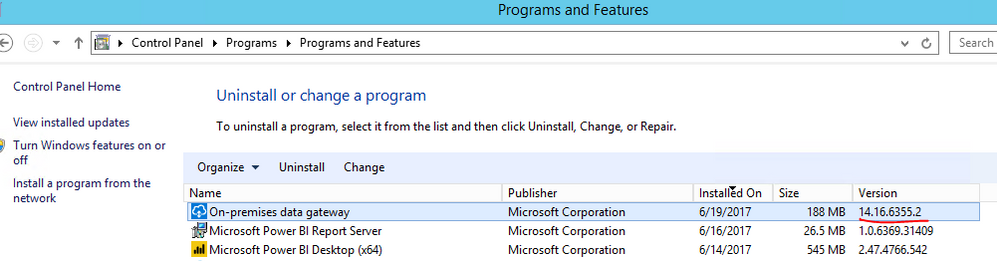
You can check installed data gateway version from Control Panel. The latest version is 14.16.6355.2. You can download latest version from here.
Best Regards,
Qiuyun Yu
@Anonymous Are you writing scripts, or just accessing tables? Looks like it is having an issue with a data type/relationship or join. The error is a pretty good pointer, but you may be able to get some more detail from the gateway error log files. Those are located waaay at the bottom of the troubleshooting guide - here
Installer logs
%localappdata%\Temp\On-premises_data_gateway_*.log
Configuration logs
%localappdata%\Microsoft\on-premises data gateway\GatewayConfigurator*.log
On-premises data gateway service logs
C:\Users\PBIEgwService\AppData\Local\Microsoft\on-premises data gateway\Gateway*.log
Thanks for your info. I will start from here 🙂
Sign up to receive a private message when registration opens and key events begin.
If you have recently started exploring Fabric, we'd love to hear how it's going. Your feedback can help with product improvements.
| User | Count |
|---|---|
| 11 | |
| 10 | |
| 7 | |
| 7 | |
| 6 |
| User | Count |
|---|---|
| 28 | |
| 24 | |
| 22 | |
| 22 | |
| 17 |