cancel
Showing results for 
Search instead for 
Did you mean: 

Next up in the FabCon + SQLCon recap series: The roadmap for Microsoft SQL and Maximizing Developer experiences in Fabric. All sessions are available on-demand after the live show. Register now

Reply
erihsehc
Helper III
Helper III

how to hide the blank selection in slicer

slicer with blank.JPGfilter.JPGslicer with blank 2.JPG

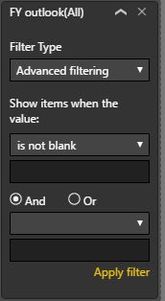
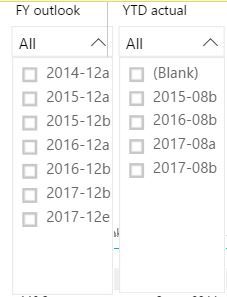
Hello, I would like to know how to hide the blank in slicer. the first screenshot is the original slicers with blank selection. after filtered "is not blank" for FY outlook, the YTD actual slicer changed (total selection reduced from 6 to 4). How to just hide the blank in slicer instead of filter out blank (do not want to affect another slicer due to fliter out blank). thanks


Best regards

ER


4 REPLIES 4
v-caliao-msft
Microsoft Employee
Microsoft Employee

@erihsehc,


Currently, to remove a blank selection in a slicer, we can use this technique. Drag your field onto the canvas and Select the Visual in which you can filter the blank value using page level filters and then change that visual to the slicer. That's it.


So if we add a page level filter, it will have impact for others visual. I am afraid there is no such an option to aviod this issue. 


Thank you for your understanding.


Regards,

Charlie Liao


@v-caliao-msft wrote:

@erihsehc,


Currently, to remove a blank selection in a slicer, we can use this technique. Drag your field onto the canvas and Select the Visual in which you can filter the blank value using page level filters and then change that visual to the slicer. That's it.


So if we add a page level filter, it will have impact for others visual. I am afraid there is no such an option to aviod this issue. 


Thank you for your understanding.


Regards,

Charlie Liao


hi @v-caliao-msft, I am not getting the below technique. pbix, attached the pbix, would you help to show that in the file? thanks a lot

we can use this technique. Drag your field onto the canvas and Select the Visual in which you can filter the blank value using page level filters and then change that visual to the slicer

@erihsehc,


I add custom and division to page filter and unselect blank value. 


Regards,

Charlie liao

hi @v-caliao-msft, got your idea but customer B disappear from slicer. It that possible to show all selection except blank?

Helpful resources

Announcements
New to Fabric survey Carousel

New to Fabric Survey

If you have recently started exploring Fabric, we'd love to hear how it's going. Your feedback can help with product improvements.

Power BI DataViz World Championships carousel

Power BI DataViz World Championships - June 2026

A new Power BI DataViz World Championship is coming this June! Don't miss out on submitting your entry.

Join our Fabric User Panel

Join our Fabric User Panel

Share feedback directly with Fabric product managers, participate in targeted research studies and influence the Fabric roadmap.

March Power BI Update Carousel

Power BI Community Update - March 2026

Check out the March 2026 Power BI update to learn about new features.

Top Solution Authors