cancel
Showing results for 
Search instead for 
Did you mean: 

The Power BI Data Visualization World Championships is back! Get ahead of the game and start preparing now! Learn more

Reply
Anonymous
Not applicable

dashboard - changing background color of individual pinned visualizations


dashboard - changing background color of individual pinned visualizations


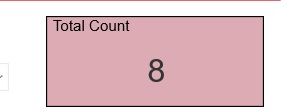
This is how my report visual looks like. I changed the background by customizing a theme. But when I pin it to a dashboard I dont see that background, why? i tried both options - "use current theme" (the background changes to white) and "use destination theme" (background matches with the dashboard settings)


what is the use of "use current theme" if it is not working? Am I doing something wrong? I am using the default theme and just changing color of the background


Untitled.jpg


1 ACCEPTED SOLUTION
v-diye-msft
Community Support
Community Support

Hi @Anonymous 


Plz kindly make sure you are using the supported browser and note the limitation:

https://docs.microsoft.com/en-us/power-bi/service-dashboard-themes#considerations-and-limitations


  • Dashboard themes cannot be applied to pinned live report pages, iframe tiles, SSRS tiles, workbook tiles, or images.

  • Dashboard themes can be viewed on mobile devices but creating a dashboard theme can only be done in Power BI service.

  • Dashboard custom themes only work with tiles pinned from reports.


Community Support Team _ Dina Ye
If this post helps, then please consider Accept it as the solution to help the other members find it more
quickly.

View solution in original post

4 REPLIES 4
v-diye-msft
Community Support
Community Support

Hi @Anonymous 


Plz kindly make sure you are using the supported browser and note the limitation:

https://docs.microsoft.com/en-us/power-bi/service-dashboard-themes#considerations-and-limitations


  • Dashboard themes cannot be applied to pinned live report pages, iframe tiles, SSRS tiles, workbook tiles, or images.

  • Dashboard themes can be viewed on mobile devices but creating a dashboard theme can only be done in Power BI service.

  • Dashboard custom themes only work with tiles pinned from reports.


Community Support Team _ Dina Ye
If this post helps, then please consider Accept it as the solution to help the other members find it more
quickly.
GilbertQ
Super User
Super User

Hi there

I have seen this happening to. I would expect it to be working by using the "Current Theme" If you still can not get it working I would log a support ticket?


Did I answer your question? Mark my post as a solution!

Proud to be a Super User!


Power BI Blog

Anonymous
Not applicable

could you guide me to log a support ticket? i havent done it before. thanks

No worries

Here is my blog post explaining how to log a support ticket

https://www.fourmoo.com/2019/09/24/using-power-bi-support-to-create-a-support-ticket/


Did I answer your question? Mark my post as a solution!

Proud to be a Super User!


Power BI Blog

Helpful resources

Announcements
Power BI DataViz World Championships

Power BI Dataviz World Championships

The Power BI Data Visualization World Championships is back! Get ahead of the game and start preparing now!

December 2025 Power BI Update Carousel

Power BI Monthly Update - December 2025

Check out the December 2025 Power BI Holiday Recap!

FabCon Atlanta 2026 carousel

FabCon Atlanta 2026

Join us at FabCon Atlanta, March 16-20, for the ultimate Fabric, Power BI, AI and SQL community-led event. Save $200 with code FABCOMM.