cancel
Showing results for 
Search instead for 
Did you mean: 

The Power BI Data Visualization World Championships is back! Get ahead of the game and start preparing now! Learn more

Reply
martijnth
Helper II
Helper II

conditional formatting in Service Mode

Dear Reader,

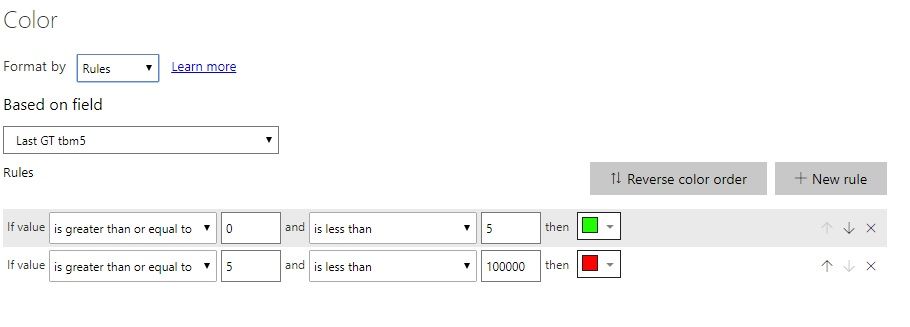
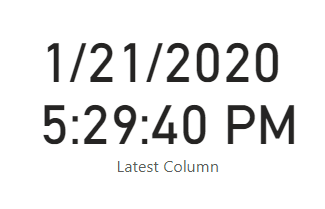
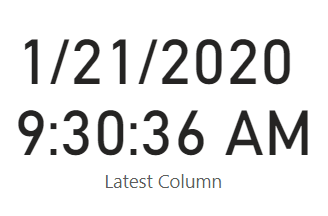
report with conditional formatting is working fine in Desktop mode. However in Service it is not working properly, see below, if measure is 5 minutes or more  background will be red, if less than 5 it should be green. You can that in service mode 2 are working, 8 are not working. In desktop all 10 are fine. Any ideas how to fix this?

reg martijn

conditional formating.jpg

6 REPLIES 6
v-gizhi-msft
Community Support
Community Support

Hi,


After my test, it works well on my Power BI Service.

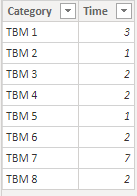
Here is my test table and measure:

52.PNG

Measure = IF(SELECTEDVALUE('Table'[Time])<=2,"Last GT within 2 min","Last GT over 2 min")

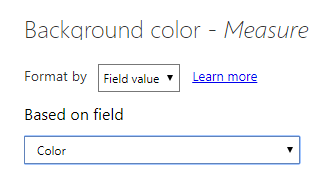
Create a color measure, then set its conditional format and choose a table visual:

Color = IF([Measure]="Last GT within 2 min","#FF0000","#00FF00")

54.PNG

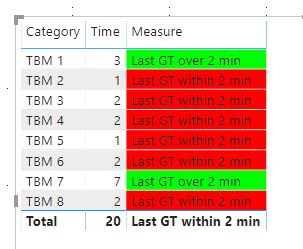
The result shows:

53.PNG

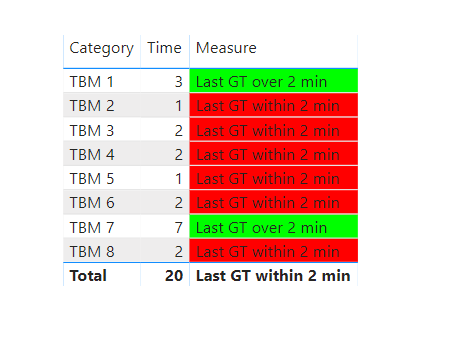
After publishing to Power BI Service, it shows well:

55.PNG

So, for your problem, please share your conditional format setting with me by screenshot.

And please tell me the visual you used for me to find the solution as soon as possible.


Best Regards,

Giotto Zhi


Dear Giotto, thx for taking the time to support me!


Funny you mention, because the same happens here, when ever I publish all in one matrix works. However in then separate Cards it is not. 


This is code used in the cards:

 
Min.SinceLastGT = IF(
(DATEDIFF(MAX(TBM_PRODUCTION_DATA[ProducedOn]),now(),MINUTE)<4),
"Last GT within 2 min.",CONCATENATE(CONCATENATE("Last GT ",
DATEDIFF(MAX(TBM_PRODUCTION_DATA[ProducedOn]),now(),MINUTE))," Min. ago")
)
 
Formatting happens with(deliberately split measures for all machines, otherwise even in desktop not working):
 
Last GT tbm1 = CALCULATE
(DATEDIFF(MAX(TBM_PRODUCTION_DATA[ProducedOn]),now(),MINUTE),
Filter(TBM_PRODUCTION_DATA,TBM_PRODUCTION_DATA[EquipmentID]="TBM 1"))
 
in: 
conditional formating 2.jpg

Hi,


After my much test, i seem to find the key point of problem, it is due to different calculation of current time by time zone on Power BI Desktop and Power BI Service.

When you refresh dataset on Power BI Service, it displays the different time:

81.PNG   82.PNG

So in this case, you should not use NOW() dax expression but give a sepcific time you want.


Best Regards,

Giotto Zhi


Hi Giotto,

thanks for your support, not sure how to capture the current time with using something like NOW() or UTCNOW(). How would you do this?

reg martijn

Hi,


Now() is used to show your computer time on Power BI Desktop and UTC time on Power BI Service.

And UTCNow() is used to show UTC time both on Power BI Desktop and Service.


Best Regards,

Giotto Zhi 

Seth_C_Bauer
Community Champion
Community Champion

@martijnth I would suggest creating a support ticket - support.powerbi.com or add this into the issues.powerbi.com forums as this type of thing happens periodically with different features and logging them in the above areas helps raise awareness.


Looking for more Power BI tips, tricks & tools? Check out PowerBI.tips the site I co-own with Mike Carlo. Also, if you are near SE WI? Join our PUG Milwaukee Brew City PUG

Helpful resources

Announcements
Power BI DataViz World Championships

Power BI Dataviz World Championships

The Power BI Data Visualization World Championships is back! Get ahead of the game and start preparing now!

December 2025 Power BI Update Carousel

Power BI Monthly Update - December 2025

Check out the December 2025 Power BI Holiday Recap!

FabCon Atlanta 2026 carousel

FabCon Atlanta 2026

Join us at FabCon Atlanta, March 16-20, for the ultimate Fabric, Power BI, AI and SQL community-led event. Save $200 with code FABCOMM.