cancel
Showing results for 
Search instead for 
Did you mean: 

Level up your Power BI skills this month - build one visual each week and tell better stories with data! Get started

Reply
insurance
Frequent Visitor

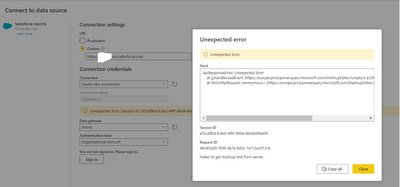
cannnot connect to the salesforce report using powerbi service

insurance_0-1675994244308.png


Problem: Using PowerBI Desktop connecting to "salesforce report" works but as it limited to 2000 rows, so try to using PowerBI Service to create dataflow but error showing after sign in (should be unable to authenticated). Why the PowerBI Desktop works but PowerBI Service cannot? Could anyone have ideas, many thanks


---------- Message ----------

Unexpected Error


---------- Stack ----------

ApiResponseError: Unexpected Error

    at g.handleLoadEvent (https://europe.prod.powerquery.microsoft.com/MashupEditor/scripts/o.a.209490d86846b900e548.bundle.js...)

    at XMLHttpRequest.<anonymous> (https://europe.prod.powerquery.microsoft.com/MashupEditor/scripts/o.a.209490d86846b900e548.bundle.js...)


---------- Session ID ----------

ef3cd9bd-b3bd-4f6f-9004-6b68b8fe40fc


---------- Request ID ----------

4b543dd5-f399-4a7e-b62c-1e7c3ac513c8

2 REPLIES 2
ReportGuru
Post Patron
Post Patron

Hi @insurance were you able to find a solution? As a workaround, maybe you can try to test your connection with a3rd party connector, which pulls data from the SF Objects API and therefore, does not have this 2k rows limitation. I've tried windsor.ai, supermetrics and funnel.io. I stayed with windsor because it is much cheaper so just to let you know other options. In case you wonder, to make the connection first search for the Salesforce connector in the data sources list:


SALESFORCE-1.png


After that, just grant access to your Salesforce account using your credentials, then on preview and destination page you will see a preview of your Salesforce fields:


SALESFORCE-2.png


There just select the fields you need. It is also compatible with custom fields and custom objects, so you'll be able to export them through windsor. Finally, just select PBI as your data destination and finally just copy and paste the url on PBI --> Get Data --> Web --> Paste the url.


SELECT_DESTINATION_NEW.png

MAwwad
Solution Sage
Solution Sage

It seems like you are encountering an error when trying to connect to a Salesforce report using PowerBI Service. To troubleshoot this issue, you can try the following steps:

  1. Check if the Salesforce account you are using has the correct permissions to connect to PowerBI.

  2. Make sure that the Salesforce instance you are connecting to is supported by PowerBI. You can check this by checking the PowerBI documentation.

  3. Try to refresh the connection or re-establish the connection from PowerBI Service.

  4. Ensure that the network connection is stable and that there are no firewalls or other security measures that are blocking the connection.

  5. If the issue persists, you can try connecting to a different Salesforce report or a different Salesforce instance.

If these steps don't help, you may need to seek help from the PowerBI support team. You can reach them by visiting the PowerBI community, creating a support request, or contacting them through their website.

Helpful resources

Announcements
April Power BI Update Carousel

Power BI Monthly Update - April 2026

Check out the April 2026 Power BI update to learn about new features.

Fabric SQL PBI Data Days

Data Days 2026 coming soon!

Sign up to receive a private message when registration opens and key events begin.

New to Fabric survey Carousel

New to Fabric Survey

If you have recently started exploring Fabric, we'd love to hear how it's going. Your feedback can help with product improvements.

Power BI DataViz World Championships carousel

Power BI DataViz World Championships - June 2026

A new Power BI DataViz World Championship is coming this June! Don't miss out on submitting your entry.