cancel
Showing results for 
Search instead for 
Did you mean: 

Get Fabric Certified for FREE during Fabric Data Days. Don't miss your chance! Request now

Reply
ThomasDay
Impactful Individual

all clustered column charts stopped working at app.powerbi.com

Hello all,


On Thursday afternoon, every clustered column chart in my 5 applications using them stopped working on app.powerbi.com while continuing to work on desktop.  So, things look great on desktop--I publish, and voila--nothing.  


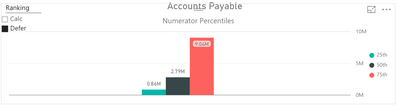
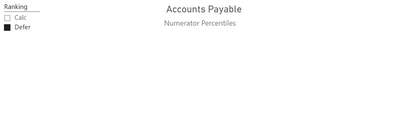
Left is the desktop as I pushed the publish to web right this minute...the right is the result.  All are this way, even those that have been up there for a week or so.  Anyone know what is up? @Eric_Zhang Any thoughts here...This is the chart you helped me with re: ISFILTERED && HasOneValue this past week...


Capture.PNGCapture1.PNG


1 ACCEPTED SOLUTION
ThomasDay
Impactful Individual

OK, I figured that perhaps the visual has been updated--and perhaps not completely backwards compatible.  (That's a lot of "perhaps-ing.") So I deleted all of the clustered bar visuals and reconfigured.  They now are working.  So...just a good watchout if others are seeing behavior like that.


Tom

View solution in original post

2 REPLIES 2
ThomasDay
Impactful Individual

BTW, same result if I change the visual to clustered with line...and the variables being shown are simple.  There are no visual filters, and as shown in the post above, I've taken all conditionals out of the calcs--so it's simply.....


25th = PERCENTILE.INC(MeasuresData[Variable_Value],.25)


If I change to the horizontal version of clustered bar chart--data shows as expected, but of course, that looks terrible in this instance.

(UPDATE: As of 7:30 EDT, horizontal does not show data either.)

ThomasDay
Impactful Individual

OK, I figured that perhaps the visual has been updated--and perhaps not completely backwards compatible.  (That's a lot of "perhaps-ing.") So I deleted all of the clustered bar visuals and reconfigured.  They now are working.  So...just a good watchout if others are seeing behavior like that.


Tom

Helpful resources

Announcements
November Power BI Update Carousel

Power BI Monthly Update - November 2025

Check out the November 2025 Power BI update to learn about new features.

Fabric Data Days Carousel

Fabric Data Days

Advance your Data & AI career with 50 days of live learning, contests, hands-on challenges, study groups & certifications and more!

FabCon Atlanta 2026 carousel

FabCon Atlanta 2026

Join us at FabCon Atlanta, March 16-20, for the ultimate Fabric, Power BI, AI and SQL community-led event. Save $200 with code FABCOMM.

Top Solution Authors
Top Kudoed Authors