Get certified for free when you join Fabric Data Days 2026 and dive into Fabric, Power BI, SQL, AI, and other essential data skills.
Join nowJuly 7 - July 17 | Round 2 of the Power BI Dataviz World Championships. Don't miss your chance! Learn more
Hi,
I'm using XML/A endpoint and when trying to run Process Database, constantly get error 'The connection either timed out or was lost.' Database in this case doesn't process.
I'm on A1 tier, when upgraded to A4, everything runs faster and timeout doesn't appear.
Any info on timeout interval?
Eugene
Hi @Eugene_Ov
The only other thing I can think of is that your model uses more memory than required on the A1 SKU, and that is why it works on an A4 SKU which has significantly more memory during the refresh.
Hi @Eugene_Ov
This would appear that on the lower SKU you do not have enough CPU's to process the data within the timeout (which defaults to 2 hours)
I would suggest looking at incremental refreshing of your dataset which will only process the last N number of days instead of the entire dataset?
Here are more details on how to complete the incremental refreshing: Incremental refresh in Power BI - Power BI | Microsoft Docs
Hi @GilbertQ
No, that's not the case. I receive this error only after 15 or 20 minutes of processing.
Eugene
Hi @Eugene_Ov ,
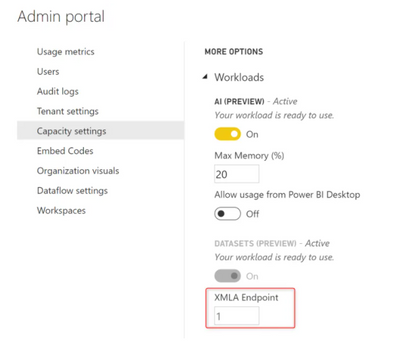
Check with your admin whether the setting of XLMA endpoint for A1 capacity has been set to 1?
Below is the related reference:
https://radacad.com/what-is-the-xmla-endpoint-for-power-bi-and-why-should-i-care
Best Regards,
Kelly
Did I answer your question? Mark my post as a solution!
Join us in Barcelona for FabCon and SQLCon, the Fabric, Power BI, SQL, and AI community event. Save €200 with code FABCMTY200.
Join Fabric Data Days 2026: 60 days of free live/on-demand sessions, challenges, study groups, and certification opportunities.
| User | Count |
|---|---|
| 18 | |
| 12 | |
| 9 | |
| 8 | |
| 5 |
| User | Count |
|---|---|
| 31 | |
| 28 | |
| 27 | |
| 24 | |
| 22 |