Join us at FabCon Atlanta from March 16 - 20, 2026, for the ultimate Fabric, Power BI, AI and SQL community-led event. Save $200 with code FABCOMM.
Register now!The Power BI Data Visualization World Championships is back! Get ahead of the game and start preparing now! Learn more
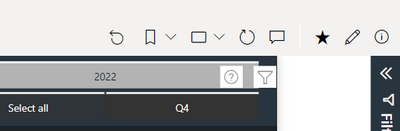
Normally, in a Workspace environment if you view a report, and make any change from its original state, the reset circular arrow will turn yellow.
It does NOT do this in an APP environment. Why not? Shouldn't it?
Vote for the idea here!
https://ideas.powerbi.com/ideas/idea/?ideaid=828b1506-7055-ed11-a76e-281878bd14b2
Hey @Anonymous ,
I voted, be sure to get all your friends and family to vote as well so that it gets on Microsoft's radar.
Proud to be a Datanaut!
Private message me for consulting or training needs.
@Anonymous Drop a link if you do! Lack of the reset button being yellow causing massive headaches for some of our users!
HI @Anonymous ,
It is an inconsistency. Actually, I would call it an outright bug because it is inconsistent.
In the app, the "reset" button is grayed out until you change something and then it become active after you have made a change. BUT, it does not turn yellow.
In the report, the "reset" button is black with no color behind it and then when you change something it gets a yellow background.
Therefore, this is working "as designed" but I would recommend that you create a bug report, link to it and we can all vote for it. Or, you can see if there is an idea out there to make these consistent.
Proud to be a Datanaut!
Private message me for consulting or training needs.
@collinq Will do....but I hate that creating a "bug" report involves starting an "idea". Wish MS would change that....
Check out the November 2025 Power BI update to learn about new features.
Advance your Data & AI career with 50 days of live learning, contests, hands-on challenges, study groups & certifications and more!