cancel
Showing results for 
Search instead for 
Did you mean: 

The Power BI Data Visualization World Championships is back! Get ahead of the game and start preparing now! Learn more

Reply
DavePx
Frequent Visitor

What is the Snapshot image field in a Dashboard's settings panel?

In Power BI portal when I navigate to a workplace and look at a Dashboard's Settings panel, underneath Owner, Dashboard Name and Contact, there is a field "Snapshot" where I can upload an image. This doesnt seem to appear on the dashboard anywhere.


What is the purpose of this field, and where does the image display?


Thanks

1 ACCEPTED SOLUTION
v-easonf-msft
Community Support
Community Support

Hi,  @DavePx 

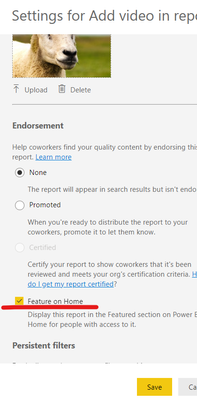
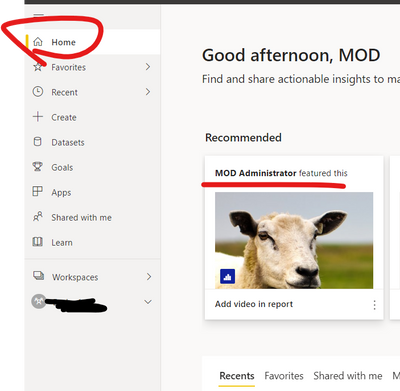
Help quickly identify and discover feature content on Home.

41.png

42.png


Feature content on colleagues' Power BI Home page 


Best Regards,
Community Support Team _ Eason
If this post helps, then please consider Accept it as the solution to help the other members find it more quickly.


View solution in original post

3 REPLIES 3
kymramosrpo
Advocate IV
Advocate IV

Does anyone know the right size for the snapshot image (in px, cm, in)? Thanks!

v-easonf-msft
Community Support
Community Support

Hi,  @DavePx 

Help quickly identify and discover feature content on Home.

41.png

42.png


Feature content on colleagues' Power BI Home page 


Best Regards,
Community Support Team _ Eason
If this post helps, then please consider Accept it as the solution to help the other members find it more quickly.


Thank you for the reply.


I see now that is what it is used for.


Interestingly, on my home page right above the Featured section where the Dashboard "snapshot" appears, the "Favorites + frequents" sections shows that same dashboard without any image (just the default PowerBI icon).


Helpful resources

Announcements
Power BI DataViz World Championships

Power BI Dataviz World Championships

The Power BI Data Visualization World Championships is back! Get ahead of the game and start preparing now!

November Power BI Update Carousel

Power BI Monthly Update - November 2025

Check out the November 2025 Power BI update to learn about new features.

FabCon Atlanta 2026 carousel

FabCon Atlanta 2026

Join us at FabCon Atlanta, March 16-20, for the ultimate Fabric, Power BI, AI and SQL community-led event. Save $200 with code FABCOMM.