Join us at FabCon Atlanta from March 16 - 20, 2026, for the ultimate Fabric, Power BI, AI and SQL community-led event. Save $200 with code FABCOMM.
Register now!The Power BI Data Visualization World Championships is back! Get ahead of the game and start preparing now! Learn more
According to the link - https://community.powerbi.com/t5/Service/Power-BI-limitations-for-dataset/m-p/533275, it states that for PPU max size is 10 GB for a single Power BI file and after refresh it can go max till 12 GB, wanted to understand then how come this document - https://powerbi.microsoft.com/en-us/pricing/ is saying model size limit of 100 GB?
- Is model size limit is workspace size? or Is it indiviual dataset size? or Is it limit of all dataset sizes together?
Thanking you in advance
Solved! Go to Solution.
Hey @Adithya_S
in Pro licensing the data model size limit is 1 GB
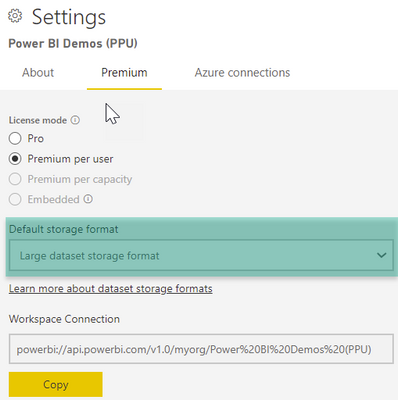
the data model size limit for PPU is 100 GB, you have to enable "Large dataset storage format"
The dataset size limit for the different flavors of Premium Per Capacity ( P[x]/A[x]/EM[x] ) can be found here: What is Power BI Premium Gen2? - Power BI | Microsoft Docs
The dataset size can be extended to the available memory of the above capacities by using the "Large dataset storage format", meaning, the dataset size can be extended from 3GB to 25GB (P1).
I would never do that as this does not leave RAM for queries created when user are using the Power BI reports.
Nevertheless, there is another limiting factor that can not be changed, this factor is the size of the PBIX that is used to publilsh data, this file size can not be larger than 10GB.
If you are expecting that the dataset size will outgrow the 10GB PBIX file size limit than you have to use incremental refresh: Incremental refresh for datasets and real-time data in Power BI - Power BI | Microsoft Docs
Hopefully, this answers your questions.
Regards,
Tom
Hey @Adithya_S
in Pro licensing the data model size limit is 1 GB
the data model size limit for PPU is 100 GB, you have to enable "Large dataset storage format"
The dataset size limit for the different flavors of Premium Per Capacity ( P[x]/A[x]/EM[x] ) can be found here: What is Power BI Premium Gen2? - Power BI | Microsoft Docs
The dataset size can be extended to the available memory of the above capacities by using the "Large dataset storage format", meaning, the dataset size can be extended from 3GB to 25GB (P1).
I would never do that as this does not leave RAM for queries created when user are using the Power BI reports.
Nevertheless, there is another limiting factor that can not be changed, this factor is the size of the PBIX that is used to publilsh data, this file size can not be larger than 10GB.
If you are expecting that the dataset size will outgrow the 10GB PBIX file size limit than you have to use incremental refresh: Incremental refresh for datasets and real-time data in Power BI - Power BI | Microsoft Docs
Hopefully, this answers your questions.
Regards,
Tom
The Power BI Data Visualization World Championships is back! Get ahead of the game and start preparing now!