cancel
Showing results for 
Search instead for 
Did you mean: 

The Power BI Data Visualization World Championships is back! It's time to submit your entry. Live now!

Reply
SQUILES
Helper I
Helper I

Web Source Credentials

Hi everyone:


I have a Excel file in my sharepoint that I use for my report. In PowerBI Desktop work fine, I configure like WEB, I paste the Sharepoint URL and ask me to sign in with my O365 account, and work fine. But when a Publish in PowerBI Service I get a error of Credentials aren't validated. What option I have to use Basic, Windows, Anonymous, I try all but still not refreshing.


Any suggestion?

1 ACCEPTED SOLUTION
v-eachen-msft
Community Support
Community Support

Hi @SQUILES ,


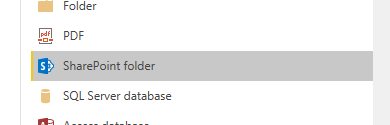
You could use SharePoint folder to import your files.

1-2.PNG

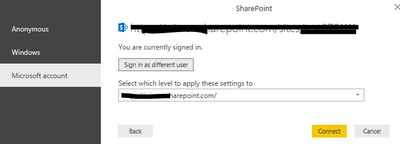
Then login your microsoft account.

1-3.PNG

When you published it to service, you need to edit your credential like the following image.
1-1.PNG

You can try my solution and tell me if it works.


Community Support Team _ Eads
If this post helps, then please consider Accept it as the solution to help the other members find it.

View solution in original post

1 REPLY 1
v-eachen-msft
Community Support
Community Support

Hi @SQUILES ,


You could use SharePoint folder to import your files.

1-2.PNG

Then login your microsoft account.

1-3.PNG

When you published it to service, you need to edit your credential like the following image.
1-1.PNG

You can try my solution and tell me if it works.


Community Support Team _ Eads
If this post helps, then please consider Accept it as the solution to help the other members find it.

Helpful resources

Announcements
FabCon Atlanta 2026 carousel

FabCon Atlanta 2026

Join us at FabCon Atlanta, March 16-20, for the ultimate Fabric, Power BI, AI and SQL community-led event. Save $200 with code FABCOMM.