

cancel
Showing results for 
Search instead for 
Did you mean: 

Learn from the best! Meet the four finalists headed to the FINALS of the Power BI Dataviz World Championships! Register now

Reply
MAJackson
Frequent Visitor

Visual Header now working when enabled - I need to export data

Hello All,


On all of my reports but this one, when I mouse over the visual I am able to see a series of options: Filter, focus mode, more options, etc.  I have a table of resource names that I need to have thoes options active for.  In Power BI desktop I can select more options and export the data as a CSV.  When I publish the report the mouse over options are gone.  


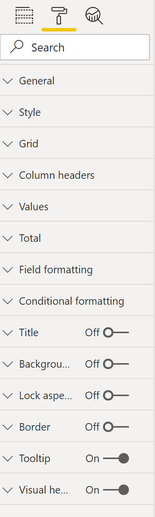
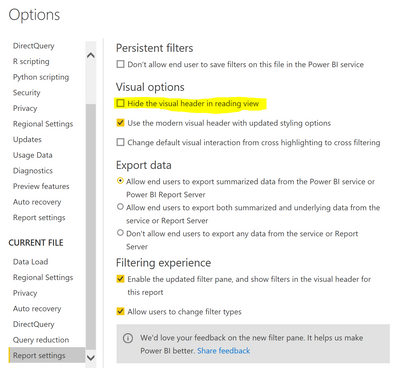
I have the option for visual header enabled in desktop and on the web (see images below).  Do you know how to get these options back?  I re-created the visual from scratch but they were still off.  (NOTE: they are off for the entire report not just this visual)


OPTIONS:

Options.PNG


SETTINGS:

Settings.PNG


PUBLISHED WEB RESULT:

result.PNG


Thanks!


1 REPLY 1
Anonymous
Not applicable

@MAJackson when you say you can't export in "Web" - do you mean in the Power BI Service (app.powerbi.com), or when you perform the "Publish to Web" feature and access the report URL that is generated?

Outside of just properties, there are other options in a report file (PBIX) that could impact the accessing of that feature. One in particular I know of is under Options and Settings - report settingsimage.png

Helpful resources

Announcements
Join our Fabric User Panel

Join our Fabric User Panel

Share feedback directly with Fabric product managers, participate in targeted research studies and influence the Fabric roadmap.

February Power BI Update Carousel

Power BI Monthly Update - February 2026

Check out the February 2026 Power BI update to learn about new features.

FabCon Atlanta 2026 carousel

FabCon Atlanta 2026

Join us at FabCon Atlanta, March 16-20, for the ultimate Fabric, Power BI, AI and SQL community-led event. Save $200 with code FABCOMM.