cancel
Showing results for 
Search instead for 
Did you mean: 

The Power BI Data Visualization World Championships is back! Get ahead of the game and start preparing now! Learn more

Reply
nalin_d
Frequent Visitor

Visual Caching

Hello,


I am encoutnering an issue, with the visual cache, 


I have a excel data source, when i refresh the report with the updated data, some users gets the updated data instantly. Where as for some user, updated data is not visible , they can see the previous data.


i have tried with Dax Editor  & "Data Load :  Data Cache Management Options" by going through the available tutorials online, but it didn't work .


This is a major issue, please suggest a way ou

4 REPLIES 4
v-easonf-msft
Community Support
Community Support

Hi , @nalin_d 

How do you share your report?

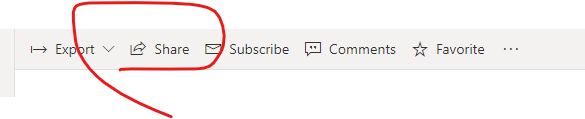
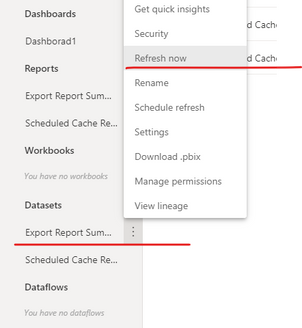
If you share the report via the "Share" button, make sure that users who cannot see the updated data have already refreshed the data set before refreshing the report visual .

 30.png

28.png29.png


If it is still not resolved, please try to upload your report to a new workspace and share again.


Best Regards,
Community Support Team _ Eason

Hey,


Yes, they do refresh the dataset, after which the "Refreshed" time stamp gets updated, but the data is not refreshed.

I cannot share the report with the different workspace , as it is an organizatinal report , and resharing with the user with the differnet workspace will create confusion.


Thanks 

Hi , @nalin_d 

Could you please tell me whether your problem has been solved?
If it is,  please mark the helpful replies or add your reply as Answered to close this thread.
More people will learn new things here. If you haven't, please feel free to ask.Best Regards,
Community Support Team _ Eason
If this post helps, then please consider Accept it as the solution to help the other members find it more quickly.

Hi , @nalin_d 

Can you try to remove the original dataset and related report before uploading the new report to the original workspace?

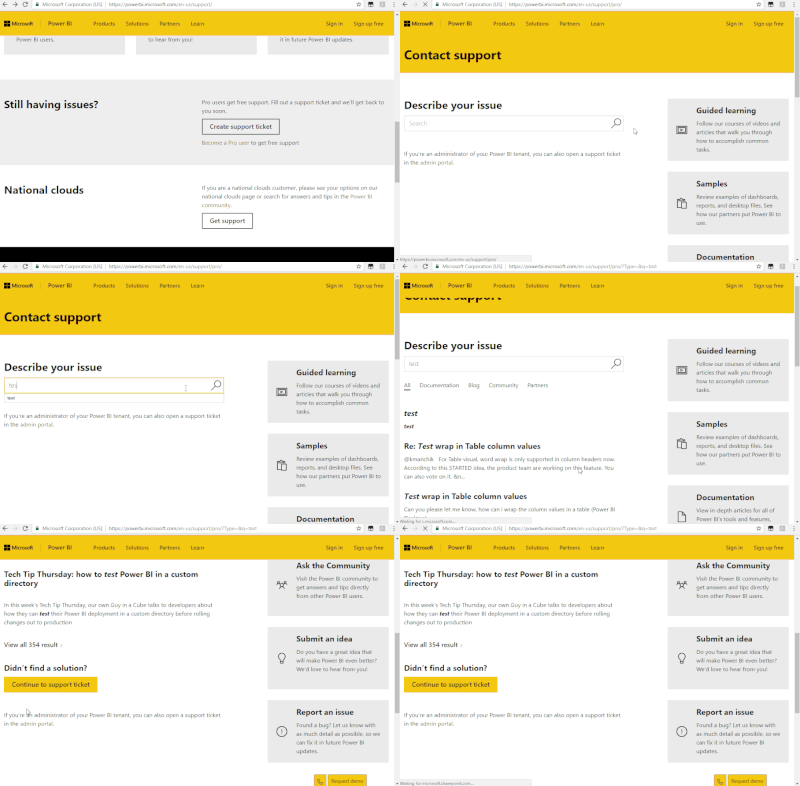
In addition, It is recommended to create a support ticket to investigate this issue.Once you create a support ticket and get any workaround, please kindly share it here for reference.

https://powerbi.microsoft.com/en-us/support/

Support Ticket.gif

Best Regards,
Community Support Team _ Eason


Helpful resources

Announcements
Power BI DataViz World Championships

Power BI Dataviz World Championships

The Power BI Data Visualization World Championships is back! Get ahead of the game and start preparing now!

December 2025 Power BI Update Carousel

Power BI Monthly Update - December 2025

Check out the December 2025 Power BI Holiday Recap!

FabCon Atlanta 2026 carousel

FabCon Atlanta 2026

Join us at FabCon Atlanta, March 16-20, for the ultimate Fabric, Power BI, AI and SQL community-led event. Save $200 with code FABCOMM.