Get certified for free when you join Fabric Data Days 2026 and dive into Fabric, Power BI, SQL, AI, and other essential data skills.
Join nowJuly 7 - July 17 | Round 2 of the Power BI Dataviz World Championships. Don't miss your chance! Learn more
Hi ,
I've followed the correct method of apply filters and viewer roles for a report.
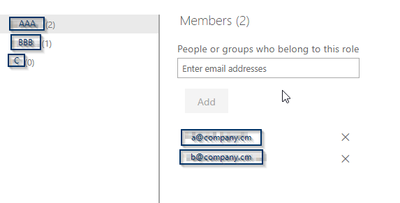
1. I created the roles using a very simple filter in the PBI Desktop such as AccountId = 1 for the first role, AccountID = 2 for the second, AccountID= 3 for the third:
2. I've updated the RLS security by adding the company members ( using their email ) to their respective roles.
The test view works great but when asking those members to view the report, they don't have the same view. I.e, they see other accounts.
Any thoughts?
Hi @RogerSteinberg ,
I think the users are the members of your workspace. If users have access to edit content in the workspace, RLS can't restrict them. The document: Row-level security (RLS) with Power BI has specific instructions:
Be aware that in the Power BI service, members of a workspace have access to datasets in the workspace. RLS doesn't restrict this data access.
The relative role in workspace are admin, member and contributor. You could change their role to viewer. Then they will just view the data what you set.
Best Regards,
Xue Ding
If this post helps, then please consider Accept it as the solution to help the other members find it more quickly.
I tried that. I put them as viewer and even removed them from the workspace and they were still able to view the full content.
Join us in Barcelona for FabCon and SQLCon, the Fabric, Power BI, SQL, and AI community event. Save €200 with code FABCMTY200.
Join Fabric Data Days 2026: 60 days of free live/on-demand sessions, challenges, study groups, and certification opportunities.
| User | Count |
|---|---|
| 16 | |
| 13 | |
| 8 | |
| 8 | |
| 5 |
| User | Count |
|---|---|
| 30 | |
| 27 | |
| 25 | |
| 24 | |
| 24 |