Don't miss your chance to take the Fabric Data Engineer (DP-600) exam for FREE! Find out how by attending the DP-600 session on April 23rd (pacific time), live or on-demand.
Learn moreNext up in the FabCon + SQLCon recap series: The roadmap for Microsoft SQL and Maximizing Developer experiences in Fabric. All sessions are available on-demand after the live show. Register now
Hi,
So I have a published power bi report however the user/client would now like a feature where they can manually add in data which isnt in the data source.
Is there an add in/visualistaions which allows users to edit the report and make calculations?
Eg report says there is 20million in account
user has 10million which hasnt been entered
To get an accuarate average they need to enter the 10 million
this can be on a separate table and doesnt need to be saved on the report
Hi @Anonymous
There's not a native part of Power BI that allows you to add or update data. It is after all a reporting service and usually the data is maintained by other systems, like accounting software, databases etc.
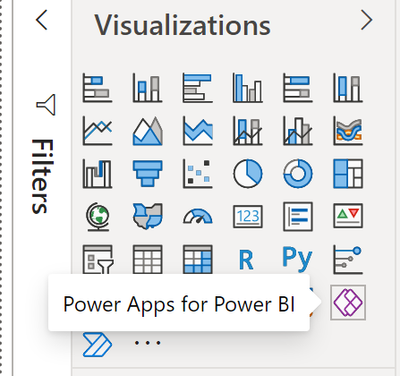
However Microsoft have other applications that can do this and integrate with Power BI. "Power Apps" allow you to build data entry and editing screens that will let users change and update data. These screens can be integrated with PowerBI via the "Power Apps for Power BI" visualisation..
You can find our more about Power Apps here: Business Apps | Microsoft Power Apps
This video is a good overview (9) POWERAPPS and POWER BI can do what?!? It's bananas! - YouTube
Like most powerfull tools, Power Apps needs some careful study.
Hope this helps
Stuart
If you have recently started exploring Fabric, we'd love to hear how it's going. Your feedback can help with product improvements.
A new Power BI DataViz World Championship is coming this June! Don't miss out on submitting your entry.
Share feedback directly with Fabric product managers, participate in targeted research studies and influence the Fabric roadmap.
| User | Count |
|---|---|
| 11 | |
| 11 | |
| 9 | |
| 8 | |
| 8 |