cancel
Showing results for 
Search instead for 
Did you mean: 

Try your skills in the Power BI Dataviz World Championship! Round one ends June 26. Join now

Reply
mjcuccia
Frequent Visitor

User Access Report

How can I create a report displaying basic user permissions for workspaces, reports, and dashboards?

1 ACCEPTED SOLUTION
Anonymous
Not applicable

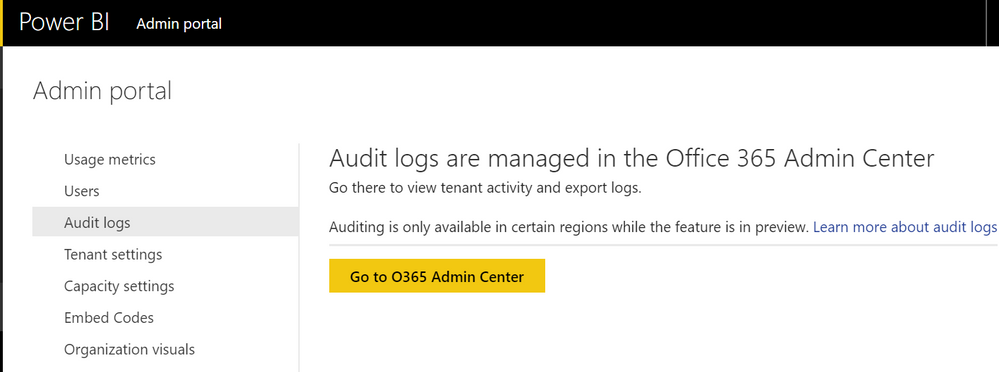
@mjcuccia, you can get to it via the Admin Portal BUT you have to be an O365 admin to actually be able to see it. The Power BI admin role does not have access to it. Neal Analytics created a nice, easy to read template to view the data (see more here) because it does come out of the O365 portal in a very ugly csv format. Also you to have turned on auditing in your tenant settings before the audit report will populate

Audit Logs.png


View solution in original post

3 REPLIES 3
Anonymous
Not applicable

From what I understand there is no report currently available that shows current members of a workspace, app, etc. You would have to use the audit report and tie it all together. This has been something that our organization has wanted as well.

Where do I find the audit report?

Anonymous
Not applicable

@mjcuccia, you can get to it via the Admin Portal BUT you have to be an O365 admin to actually be able to see it. The Power BI admin role does not have access to it. Neal Analytics created a nice, easy to read template to view the data (see more here) because it does come out of the O365 portal in a very ugly csv format. Also you to have turned on auditing in your tenant settings before the audit report will populate

Audit Logs.png


Helpful resources

Announcements
Fabric Data Days is here Carousel

Fabric Data Days 2026

Don't miss out on Data Days, June 15 through August 7. Learn Fabric, Power BI, SQL, AI and more.

Power BI DataViz World Championships carousel

Power BI DataViz World Championships - June 2026

A new Power BI DataViz World Championship is coming this June! Don't miss out on submitting your entry.