Join us at FabCon Atlanta from March 16 - 20, 2026, for the ultimate Fabric, Power BI, AI and SQL community-led event. Save $200 with code FABCOMM.
Register now!The Power BI Data Visualization World Championships is back! Get ahead of the game and start preparing now! Learn more
Good morning everyone, several months ago I started with this project of creating a report with a data source unfortunately already obsolete for me, but it is the one used by the system in the place where I work, I had many inconveniences to be able to do the massive load of all the data from the different databases in DBF, luckily in the last 45 days I was able to make a lot of progress and I was already shaping the report, but now when I want to do the data synchronization test to schedule automatic updates.
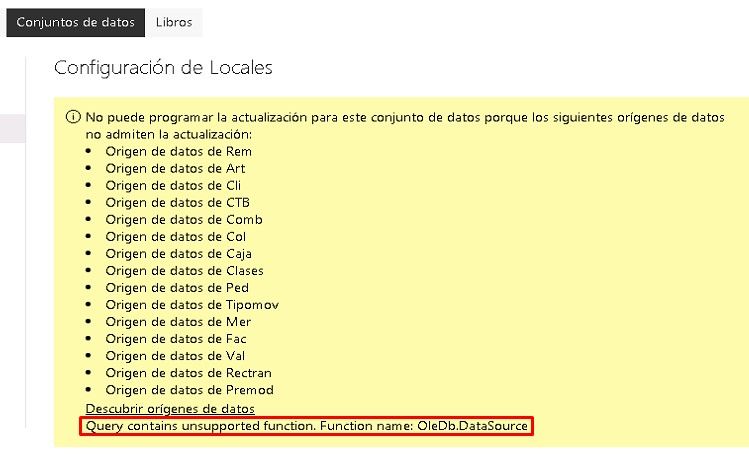
I was able to publish the report with the data without problems, I can connect from power bi desktop without problems with the data source in my Power BI panel in the cloud, but when I want to configure the data source with the gateway it tells me the error seen in the image. It doesn't even give me the option to configure and I really don't know what to do, I'm really disoriented about it.
I would appreciate any kind of help and experience working in synchronization with DBF.
From already thank you very much,
Regards.
"You cannot schedule the update for this dataset because the following data sources do not support the update:"
Unrecognized data source
Hi @MatiasVizzari ,
It seems the issue be caused by unsupported data source, currently Power BI don't support .dbf file. You can check this documentation for Power BI supported data sources. In addition, here is one similar topic shared on Power BI Ideas, you can vote it up and add your comments there to improve Power BI on this feature.
Best Regards
Rena
Good day, thanks for the answer, the issue is that in power bi desktop I have it working and updating without problem, the problem is when I upload it to the service in the power bi panel, because it is the only way I can find to update it automatically , since being tables in DBF it is necessary to update it daily so that the data is updated.
unless there is something I don't know could be done.
The Power BI Data Visualization World Championships is back! Get ahead of the game and start preparing now!
| User | Count |
|---|---|
| 55 | |
| 49 | |
| 44 | |
| 16 | |
| 16 |