Join us at FabCon Atlanta from March 16 - 20, 2026, for the ultimate Fabric, Power BI, AI and SQL community-led event. Save $200 with code FABCOMM.
Register now!View all the Fabric Data Days sessions on demand. View schedule
Hello
thank you for your comments.
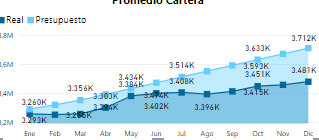
i have an area chart with two values (Budget and Real) between January to December of 2018. the model that i used is
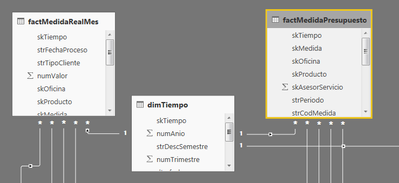
[factReal] --> valReal
[factBudget] --> valBudget
[dimTime] --> descMonth
the relationship is [factReal]<--[dimTime]-->[factBudget]
the users needs to export underliying data, but the file result only export data from table factBudget, and need also the table factReal.
what should be to do ?
Based on your description, you want to achieve the whole dataset and you have clicked the ellipse on the right-top hand in a chart then click "export data", right? This will only export underly data in that chart, not the whole dataset. As a workaround, you can click File-> Export-> Power Bi template. Next time when you open the PBIT file, you can do operation on the whole dataset.
Community Support Team _ Jimmy Tao
If this post helps, then please consider Accept it as the solution to help the other members find it more quickly.
thank you for your comment
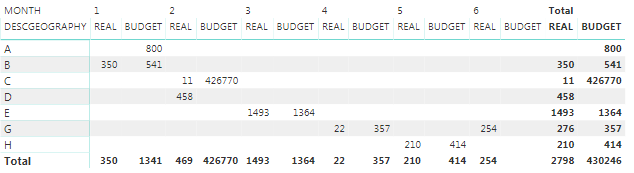
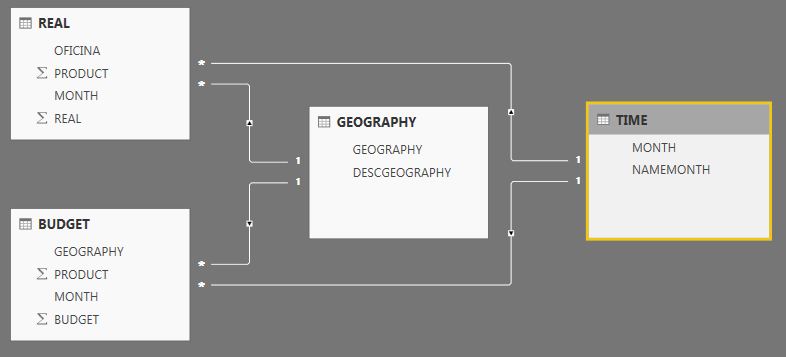
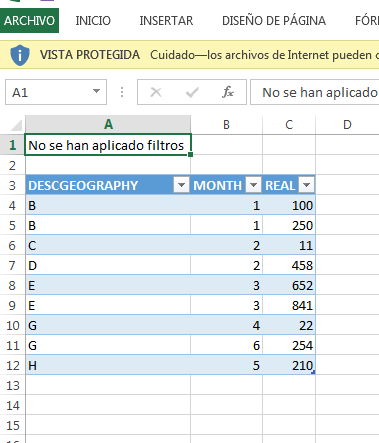
the users only needs export the values that exists in the chart or table. for example, there is a example for a matrix. the need is that when the user clicked in the section export data / Underlying data obtains all values of the table or chart. for this example budget and real values. but now only the values for data real and not the budget.
Matrix
Model
the result (Underlying data)
only export the values of the table REAL and not the Budget table
Check out the November 2025 Power BI update to learn about new features.
Advance your Data & AI career with 50 days of live learning, contests, hands-on challenges, study groups & certifications and more!