cancel
Showing results for 
Search instead for 
Did you mean: 

Get Fabric Certified for FREE during Fabric Data Days. Don't miss your chance! Request now

Reply
Anonymous
Not applicable

Unable to view refresh history for datamart

I created a couple of datamarts using a few SQL Server tables as the source.  I set up incremental refreshes on the datamarts which seemed to work successfully.  When I go to download the refresh details of the datamart, nothing happens.  I was able to download the Excel dump of the refresh just a few days ago when I was "testing", but now, nothing.


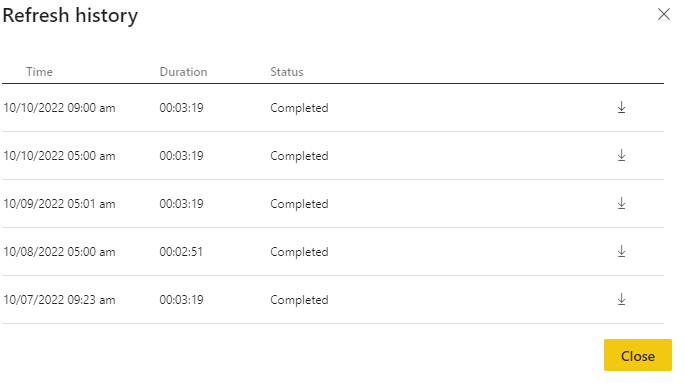
When I look at the refresh history page, I can see that the refresh was successful and the total time of the refresh.  I also see the little arrow that is supposed to download the refresh to Excel.  Again, when I click on the arrow, nothing happens.


I realize that the datamart is still in preview but wondering if anyone else has had this issue or know of a fix.  I would like to verify that my incremental refreshes are working correctly before I start building visualizations on the data.  


Thanks,

Geeco1

2 REPLIES 2
Anonymous
Not applicable

Hi @Anonymous, unfortunately, that did not seem to work.  I added a new table to the datamart and set a refresh schedule.  I seemed to refresh successfully, but still not able to download the Excel file.  All I see is what is in the attached picture.  I click on the small download arrow, and nothing happens.Refresh.PNG

Anonymous
Not applicable

Hi @Anonymous ,

I have found a similar post , please refer to it to see if it helps you.

  • The refresh history continued to refuse to display. What I ended up doing was edit the datamart, add a new entity and force it to rebuild its ETL rules. Then let it refresh.

    Overnight, the scheduled refresh occurred, and things are back to normal today.

More details : Solved: Datamart refresh history - error - Microsoft Power BI Community


If it still does not helps, please provide more details. 


Best Regards

Community Support Team _ Polly


If this post helps, then please consider Accept it as the solution to help the other members find it more quickly.

Helpful resources

Announcements
November Power BI Update Carousel

Power BI Monthly Update - November 2025

Check out the November 2025 Power BI update to learn about new features.

Fabric Data Days Carousel

Fabric Data Days

Advance your Data & AI career with 50 days of live learning, contests, hands-on challenges, study groups & certifications and more!

FabCon Atlanta 2026 carousel

FabCon Atlanta 2026

Join us at FabCon Atlanta, March 16-20, for the ultimate Fabric, Power BI, AI and SQL community-led event. Save $200 with code FABCOMM.

Top Solution Authors