cancel
Showing results for 
Search instead for 
Did you mean: 

The Power BI Data Visualization World Championships is back! Get ahead of the game and start preparing now! Learn more

Reply
Anonymous
Not applicable

Unable to export powerbi report from Power BI workspace

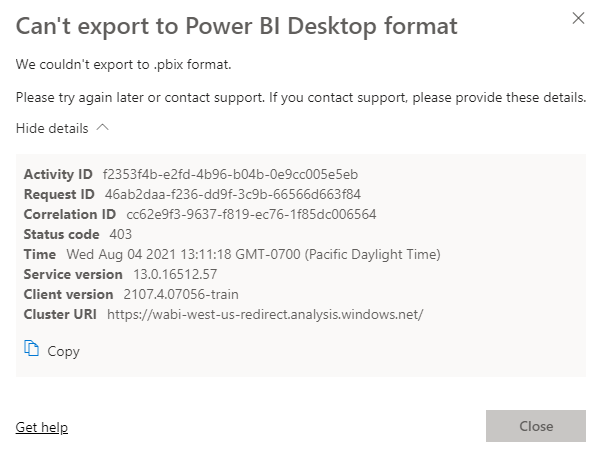
I am trying to export power bi report from workspace. The report was created by me in powerbi desktop and I uploaded it to the workspace. I am getting the below errorwhen trying to export.


monikamishra_0-1628108067558.png

What's the root cause of the issue and how to fix it ?


7 REPLIES 7
Anonymous
Not applicable

Hi  @Anonymous ,

Please check these:

There are a few important considerations and limitations associated with downloading (exporting) a .pbix file from Power BI service.

  • To download the file, you must have edit access to the report
  • The report must have been created using Power BI Desktop and been published to the Power BI service, or the .pbix must have been uploaded to the service.
  • This feature will not work with reports originally created in the Power BI service, including content packs.
  • You should always be using the latest version of Power BI Desktop when opening downloaded files. Downloaded .pbix files may not open in non-current versions of Power BI Desktop.
  • If your administrator has turned off the ability to export data, this feature will not be visible in the Power BI service.
  • Dataset with incremental refresh can't be downloaded to a .pbix file.
  • Sometime this happen due to network bottleneck, would suggest to try downloading different time and see it it work.

https://docs.microsoft.com/en-us/power-bi/service-export-to-pbix


Best Regards,

Liu Yang

If this post helps, then please consider Accept it as the solution to help the other members find it more quickly.

Anonymous
Not applicable

Hi @Anonymous , 


None of the points mentioned by you is applicable for my report.

GilbertQ
Super User
Super User

Hi @Anonymous 


It would appear that you created this report in the Power BI Service as per your link?


Did I answer your question? Mark my post as a solution!

Proud to be a Super User!


Power BI Blog

GilbertQ
Super User
Super User

Hi @Anonymous 


Did you edit the report at all in the Power BI Service?

Or I do think if it is a composite model it cannot be downloaded?


If you have got the PBIX could I ask why you are trying to export it?


Did I answer your question? Mark my post as a solution!

Proud to be a Super User!


Power BI Blog

Anonymous
Not applicable

No editing of the report in Power BI Service.

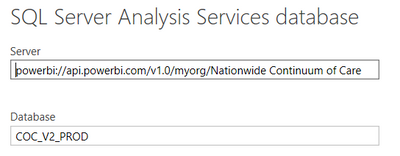
It's not a composite model. The model is created in SSAS which is based on a database.  We have hosted this SSAS model in PowerBI premium workspace (this is something which we have done new). The report connects to this model 

monikamishra_0-1628116881646.png

If someone else wants to work in the report, they could easily download from the workspace. I know I can keep it somewhere else in the cloud and share. But I want to know why it's not downloadable.

Hi @Anonymous 


I tried exactly the same steps as to what you have explain on my PPU tenant and I also cannot download the pbix file.


I think that this is a current limitation. And you have to have the PBIX file locally.


You can vote for the idea on https://ideas.powerbi.com


Did I answer your question? Mark my post as a solution!

Proud to be a Super User!


Power BI Blog

Anonymous
Not applicable

Thanks @GilbertQ for checking. Could you refer to this MS document and check if your model satisfies any point -


https://docs.microsoft.com/en-us/power-bi/create-reports/service-export-to-pbix


I don't do data modelling so I am not sure if this issue is because of one of the reasons mentioned in this link or is it a general error.


Helpful resources

Announcements
Power BI DataViz World Championships

Power BI Dataviz World Championships

The Power BI Data Visualization World Championships is back! Get ahead of the game and start preparing now!

November Power BI Update Carousel

Power BI Monthly Update - November 2025

Check out the November 2025 Power BI update to learn about new features.

FabCon Atlanta 2026 carousel

FabCon Atlanta 2026

Join us at FabCon Atlanta, March 16-20, for the ultimate Fabric, Power BI, AI and SQL community-led event. Save $200 with code FABCOMM.