Join us at FabCon Atlanta from March 16 - 20, 2026, for the ultimate Fabric, Power BI, AI and SQL community-led event. Save $200 with code FABCOMM.
Register now!The Power BI Data Visualization World Championships is back! Get ahead of the game and start preparing now! Learn more
Hi All
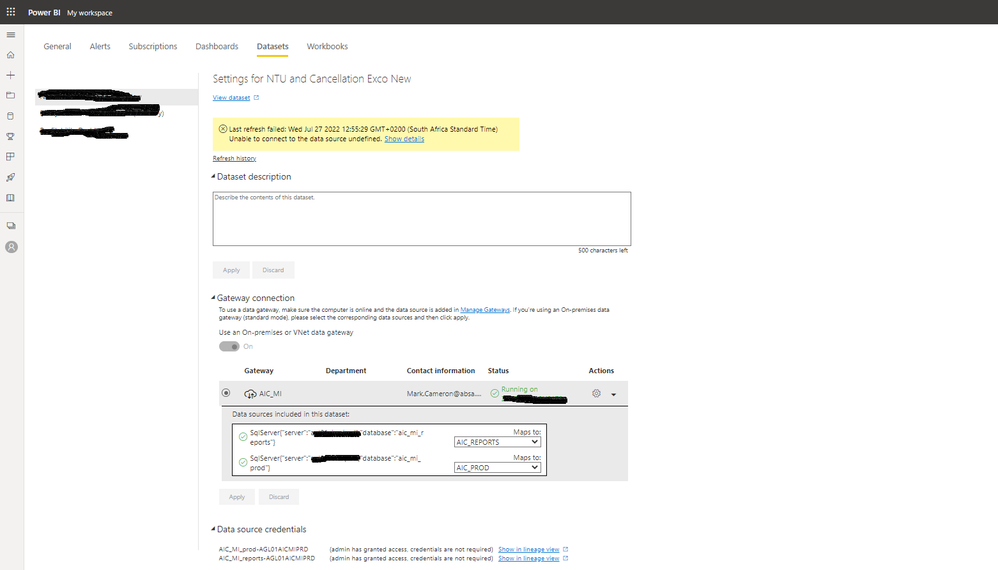
i need some help please, im getting the below error msg when i want to refresh my Dataset, i have updated my Gateways to the latest versions and Password are all in sync and security level is on Organasation on all levels. i have tried everything that i can think of, maybe there is something i am missing. Our SQL server is based on Azure.
Regards
Mark
it keeps on asking me to connect to a gateway, i have changed the source in desktop to Azured Sql Server as well.
Hi @MarkCam
Can you change the database connection to be "databasename.database.windows.net"
Once that is done Power BI will see that as an Azure Service and allow it to then connect directly.
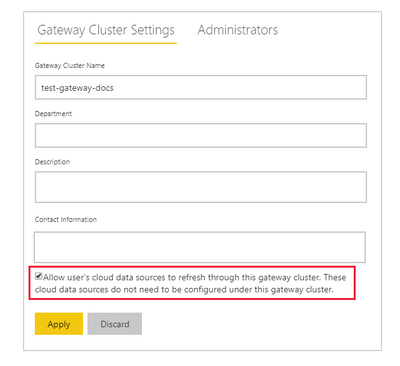
@MarkCam - Azure SQL doesn't need a gateway. Make sure the below setting is turned on in gateway settings.
Make sure the below setting is turned on in gateway setting.
Also, you need to update the data source credentials in service>>dataset >>setting.
Hi @MarkCam
If you are using an Azure SQL Database you should not need to use a Gateway and you can connect directly?
If that still fails I would chat to your DBA to make sure that have allowed connections from other Azure Sources?
And if that still does not work then log a support ticket.
The Power BI Data Visualization World Championships is back! Get ahead of the game and start preparing now!