FabCon is coming to Atlanta
Join us at FabCon Atlanta from March 16 - 20, 2026, for the ultimate Fabric, Power BI, AI and SQL community-led event. Save $200 with code FABCOMM.
Register now!- Power BI forums
- Get Help with Power BI
- Desktop
- Service
- Report Server
- Power Query
- Mobile Apps
- Developer
- DAX Commands and Tips
- Custom Visuals Development Discussion
- Health and Life Sciences
- Power BI Spanish forums
- Translated Spanish Desktop
- Training and Consulting
- Instructor Led Training
- Dashboard in a Day for Women, by Women
- Galleries
- Data Stories Gallery
- Themes Gallery
- Contests Gallery
- QuickViz Gallery
- Quick Measures Gallery
- Visual Calculations Gallery
- Notebook Gallery
- Translytical Task Flow Gallery
- TMDL Gallery
- R Script Showcase
- Webinars and Video Gallery
- Ideas
- Custom Visuals Ideas (read-only)
- Issues
- Issues
- Events
- Upcoming Events
The Power BI Data Visualization World Championships is back! Get ahead of the game and start preparing now! Learn more
- Power BI forums
- Forums
- Get Help with Power BI
- Service
- Re: Unable to access login page in Chrome
- Subscribe to RSS Feed
- Mark Topic as New
- Mark Topic as Read
- Float this Topic for Current User
- Bookmark
- Subscribe
- Printer Friendly Page

- Mark as New
- Bookmark
- Subscribe
- Mute
- Subscribe to RSS Feed
- Permalink
- Report Inappropriate Content
Unable to access login page in Chrome
Hi All,
For the past couple of weeks there appears to be an issue accessing this site via Chrome. It just returns a 500 error when attempting to log in. However the page, and the login, works fine using IE instead.
In Chrome it returns:
"
This page isn’t working
app.powerbi.com is currently unable to handle this request.
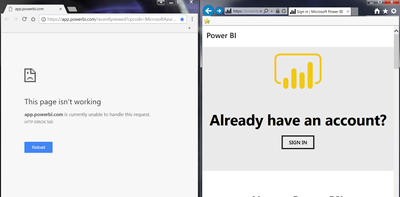
Windows 7 64-bit
Chrome V65.0.3325.146 (Updated today)
Does the same if I use the link:
https://app.powerbi.com/recentlyviewed?cpcode=MicrosoftAzureConsumptionInsights
Or if I go to the main page and click sign in.
https://powerbi.microsoft.com/en-us/
Any help would be appreciated.
With regards,
Justin
Solved! Go to Solution.


- Mark as New
- Bookmark
- Subscribe
- Mute
- Subscribe to RSS Feed
- Permalink
- Report Inappropriate Content
Hi @JustinB,
By My test with the Chrome desktop latest version(Version65.0.3325.146), I can't reproduce your issue.
You could try to Clear your cookies & cache on Chrome which worked for others.
In addition, you could refer to this similar post.
Best Regards,
Cherry
If this post helps, then please consider Accept it as the solution to help the other members find it more quickly.

- Mark as New
- Bookmark
- Subscribe
- Mute
- Subscribe to RSS Feed
- Permalink
- Report Inappropriate Content

- Mark as New
- Bookmark
- Subscribe
- Mute
- Subscribe to RSS Feed
- Permalink
- Report Inappropriate Content
This solution is really useful and worked for me. Thank you!

- Mark as New
- Bookmark
- Subscribe
- Mute
- Subscribe to RSS Feed
- Permalink
- Report Inappropriate Content
Hey,
Solved by browsing as usual to app.powerbi.com, then click the small lock pad/informaiton pad left of url line with https - Site settings - Usage - clear data (delete all cookies).
Refresh the page/browser until there are zero cookies.
Sign into your PBI account again.
- Mark as New
- Bookmark
- Subscribe
- Mute
- Subscribe to RSS Feed
- Permalink
- Report Inappropriate Content
Worked like a charm, thanks a lot.
- Mark as New
- Bookmark
- Subscribe
- Mute
- Subscribe to RSS Feed
- Permalink
- Report Inappropriate Content
The trick is actually getting to the cookies that got themselves into a mess that prevented logging in.
I'd normally have the devtools panel up and you just couldn't see the cookies or anything there where you'd expect them.
But if you click on the little SSL lock/Info button...
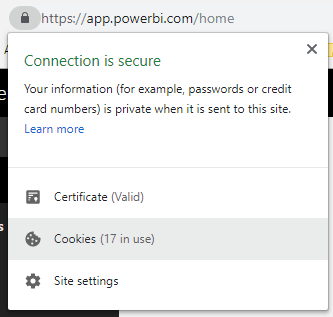
(In this case I've already resolved the problem but what it did show was 10 cookies associated with the failed app.powerbi.com site)
You can then click the Cookies item and it takes you to the Chrome settings page for app.powerbi.com
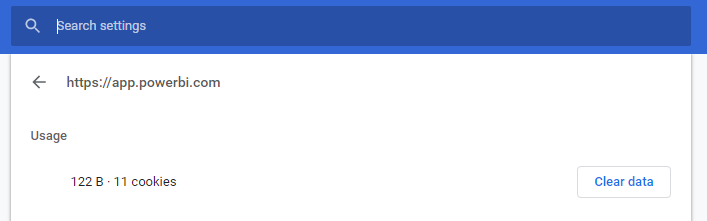
And from there you can actually clear the broken cookies and refresh the page (app.powerbi.com) to log in once again!

- Mark as New
- Bookmark
- Subscribe
- Mute
- Subscribe to RSS Feed
- Permalink
- Report Inappropriate Content
Thanks that worked... awesome! job


- Mark as New
- Bookmark
- Subscribe
- Mute
- Subscribe to RSS Feed
- Permalink
- Report Inappropriate Content
For all those where clearing cache and cookies didn't work for them (like me), this did work for me: https://www.youtube.com/watch?v=v03wlFjGLCg

- Mark as New
- Bookmark
- Subscribe
- Mute
- Subscribe to RSS Feed
- Permalink
- Report Inappropriate Content
The youtube link worked like a charm for me! I can work on my chrome browser now. This browser is so much faster than IE for PowerBI, although PowerBI is a product by Microsoft!
- Mark as New
- Bookmark
- Subscribe
- Mute
- Subscribe to RSS Feed
- Permalink
- Report Inappropriate Content
Thank you so much! Works also for me. 
- Mark as New
- Bookmark
- Subscribe
- Mute
- Subscribe to RSS Feed
- Permalink
- Report Inappropriate Content
Thanks, this work for me
Regards
@MWinter225 wrote:For all those where clearing cache and cookies didn't work for them (like me), this did work for me: https://www.youtube.com/watch?v=v03wlFjGLCg
@MWinter225 wrote:For all those where clearing cache and cookies didn't work for them (like me), this did work for me: https://www.youtube.com/watch?v=v03wlFjGLCg
- Mark as New
- Bookmark
- Subscribe
- Mute
- Subscribe to RSS Feed
- Permalink
- Report Inappropriate Content
Hi @JustinB,
By My test with the Chrome desktop latest version(Version65.0.3325.146), I can't reproduce your issue.
You could try to Clear your cookies & cache on Chrome which worked for others.
In addition, you could refer to this similar post.
Best Regards,
Cherry
If this post helps, then please consider Accept it as the solution to help the other members find it more quickly.
- Mark as New
- Bookmark
- Subscribe
- Mute
- Subscribe to RSS Feed
- Permalink
- Report Inappropriate Content
I don't know why I never think to clear my cookies. You'd think after years of tech support I'd remember to do that when I encounter something like this. I've certainly told enough users to do the same.
Helpful resources

Power BI Dataviz World Championships
The Power BI Data Visualization World Championships is back! Get ahead of the game and start preparing now!

Power BI Monthly Update - December 2025
Check out the December 2025 Power BI Holiday Recap!

FabCon Atlanta 2026
Join us at FabCon Atlanta, March 16-20, for the ultimate Fabric, Power BI, AI and SQL community-led event. Save $200 with code FABCOMM.


| User | Count |
|---|---|
| 56 | |
| 55 | |
| 31 | |
| 18 | |
| 14 |


