Join us at FabCon Atlanta from March 16 - 20, 2026, for the ultimate Fabric, Power BI, AI and SQL community-led event. Save $200 with code FABCOMM.
Register now!The Power BI Data Visualization World Championships is back! Get ahead of the game and start preparing now! Learn more
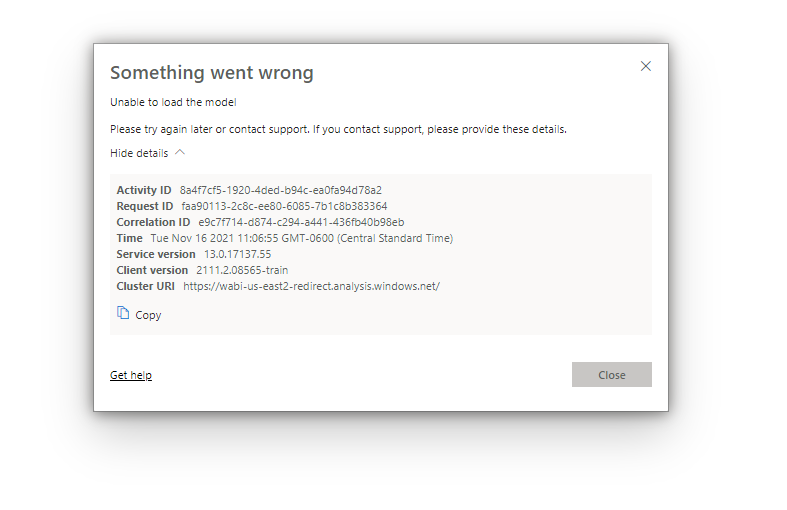
There is a user in my organization who continually gets the error message below when trying to access a report that I created. There is security and roles set up for the report, but his email address is added with full access to the data model in the Manage Roles section in Desktop, and he is added properly as a viewer in Power BI service.
I've tried deleting and readding his email in both Desktop and Service, and I even built a new duplicate report, but he still cannot access it.
Any ideas?
Solved! Go to Solution.
Hi @per771 ,
You have added his email address to the role in desktop, did you add him in the service by the follow step?
Reference about RLS: https://docs.microsoft.com/en-us/power-bi/admin/service-admin-rls
If you have done this step, please check whether he can see other reports in the workspace, if he cannot see all the reports, it’s not the RLS cause his problem, maybe his license or data source or connection mode.Also, you can check in desktop by view as. Could other users can see this report?Make sure whether the user in same tenant.
Best Regards,
Community Support Team _ kalyj
If this post helps, then please consider Accept it as the solution to help the other members find it more quickly.
Hi @per771 ,
You have added his email address to the role in desktop, did you add him in the service by the follow step?
Reference about RLS: https://docs.microsoft.com/en-us/power-bi/admin/service-admin-rls
If you have done this step, please check whether he can see other reports in the workspace, if he cannot see all the reports, it’s not the RLS cause his problem, maybe his license or data source or connection mode.Also, you can check in desktop by view as. Could other users can see this report?Make sure whether the user in same tenant.
Best Regards,
Community Support Team _ kalyj
If this post helps, then please consider Accept it as the solution to help the other members find it more quickly.
Hi @per771
Can you confirm that you can access and view the report?
What happens if you change his role from Viewer to Contributor or Member, can they then see the report?
If they can, what that means is that there is a mis-configuration with the RLS.
The Power BI Data Visualization World Championships is back! Get ahead of the game and start preparing now!