Join us at FabCon Atlanta from March 16 - 20, 2026, for the ultimate Fabric, Power BI, AI and SQL community-led event. Save $200 with code FABCOMM.
Register now!The Power BI Data Visualization World Championships is back! Get ahead of the game and start preparing now! Learn more
Hi guys,
I know that this topic was already discussed but no one of them solved my problem.
I have a published report with 2 differents data source, 2 oracle and 1 dataflow.
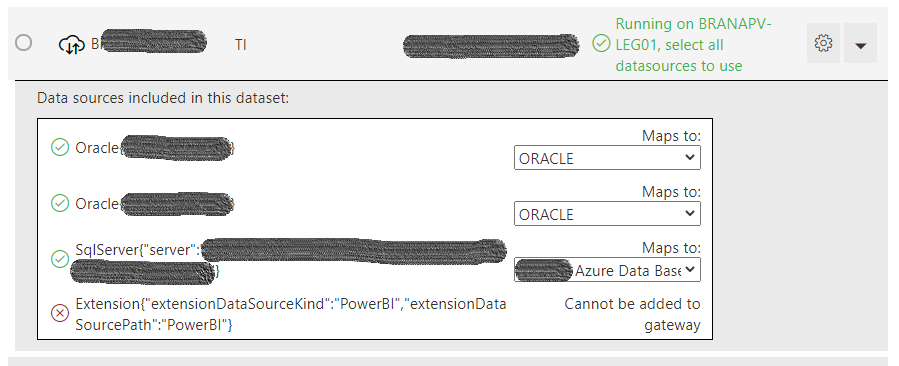
Despite having all them configured and working properly for other reports, I am not able to select the gateway on it specifically due to below message:
Extension("extensionDataSourceKind":"PowerBI","extensionDataSourcePath":"PowerBI")
It is strange because this same warning message appears for other reports and they work magically fine.
Do you have any other ideia to solve?
Solved! Go to Solution.
Guys. just to update the topic, I had to remove the dataset and report and publish it again to solve the issue.
No ideia guys?
Hi @fabiobecamp ,
Are you refreshing your data in the dataflow first, and THEN refreshing the Power BI Dataset? I believe it is has to be refreshed in order.
Proud to be a Datanaut!
Private message me for consulting or training needs.
Hi @collinq ,
See below that I am unable to select the gateway, so it is not possible to start any refresh
Hi @fabiobecamp ,
I would ask for permissions as a user for that gateway from the admin to be sure that it is not security related. Also, I would review this article to confirm that your data source is available in gateway: Power BI data sources - Power BI | Microsoft Docs (some things like R are not)
Proud to be a Datanaut!
Private message me for consulting or training needs.
The Power BI Data Visualization World Championships is back! Get ahead of the game and start preparing now!