cancel
Showing results for 
Search instead for 
Did you mean: 

Try your skills in the Power BI Dataviz World Championship! Round one ends June 26. Join now

Reply
Anonymous
Not applicable

URL query string parameters on multiple table and fields

Hi,

Is it possible to filter the report using url query string parameters on multiple tables.

When I try to filter the report in the below format , it is just filtering with first 3 filters.

Report url?filter=table1/field1 eq ‘value’ and table1/field2 eq ‘value’ and table2/field1 eq ‘value’ and table2/field2 eq ‘value’

Many Thanks,
1 ACCEPTED SOLUTION
v-lid-msft
Community Support
Community Support

Hi @Anonymous ,


Based on my test, the URL query string parameters can filter more than 3 filters on my side, we tested with the following format:


https://ReportURL?filter=Budget/Brand eq 'Litware' and Budget/CountryRegion eq 'United States' and Sales_x0020_2015/Month eq 'April' and Sales_x0020_2015/Sale_x0020_2014 eq 172.00
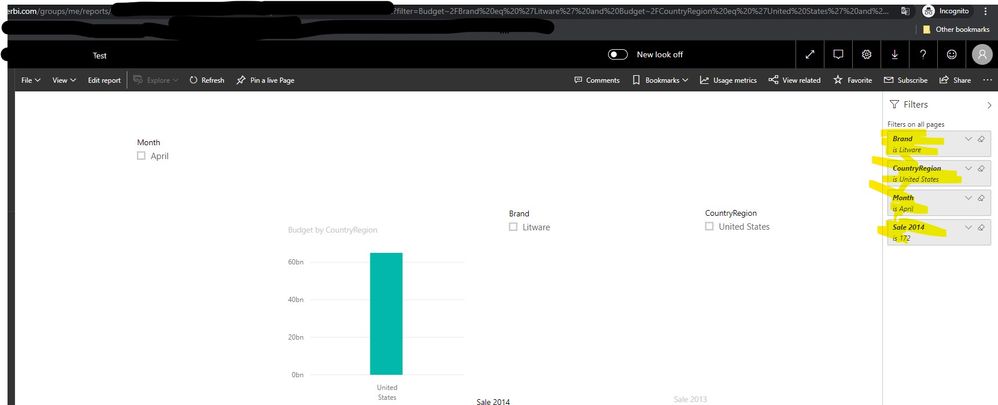
 

1.jpg 


Based on this documentReport URL filters have a 10-expression limit (10 filters connected by AND). Special characters and spaces require some additional formatting.  please refer to this document about the additional format: https://docs.microsoft.com/en-us/power-bi/service-url-filters#special-characters-in-url-filters


Best regards,


Community Support Team _ Dong Li
If this post helps, then please consider Accept it as the solution to help the other members find it more quickly.

View solution in original post

1 REPLY 1
v-lid-msft
Community Support
Community Support

Hi @Anonymous ,


Based on my test, the URL query string parameters can filter more than 3 filters on my side, we tested with the following format:


https://ReportURL?filter=Budget/Brand eq 'Litware' and Budget/CountryRegion eq 'United States' and Sales_x0020_2015/Month eq 'April' and Sales_x0020_2015/Sale_x0020_2014 eq 172.00


1.jpg 


Based on this documentReport URL filters have a 10-expression limit (10 filters connected by AND). Special characters and spaces require some additional formatting.  please refer to this document about the additional format: https://docs.microsoft.com/en-us/power-bi/service-url-filters#special-characters-in-url-filters


Best regards,


Community Support Team _ Dong Li
If this post helps, then please consider Accept it as the solution to help the other members find it more quickly.

Helpful resources

Announcements
Fabric Data Days is here Carousel

Data Days 2026

Don't miss out on Data Days, June 15 through August 7. Learn Fabric, Power BI, SQL, AI and more.

May Power BI Update Carousel

Power BI Monthly Update - May 2026

Check out the May 2026 Power BI update to learn about new features.

Power BI DataViz World Championships carousel

Power BI DataViz World Championships - June 2026

A new Power BI DataViz World Championship is coming this June! Don't miss out on submitting your entry.