

Join us at FabCon Atlanta from March 16 - 20, 2026, for the ultimate Fabric, Power BI, AI and SQL community-led event. Save $200 with code FABCOMM.
Register now!Get Fabric Certified for FREE during Fabric Data Days. Don't miss your chance! Request now
Is there a way to hide the below? Do not want to show the Data updated date and the metadata information for a particular report.
Hi @shanawazsheriff , @Tony5 ,
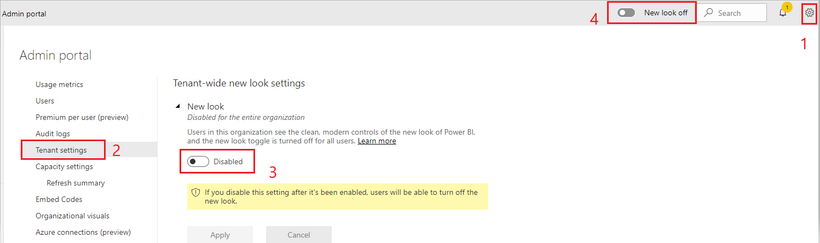
You could disable "New look" to hide "Date updated xx/x/xx".
This will cover all the reports. Unfortunately, we can't hide a few specific reports. You could submit an idea to make Power BI better.
Hi Xue,
Is there anything like this in Oct 2022? Can't seem to control the title/metadata display now
I found this idea posted - it needs votes! I agree this would be a helpful feature as for some reports - the data updated is not accurate and we should be able to hide it.
https://ideas.powerbi.com/ideas/idea/?ideaid=329ec092-d560-eb11-8fed-281878de77da
Thanks for the reply! Hope we get this option of disabling it at a report level. The updated date on the banner is confusing to our business users. And am sure at some point the new look would go away altogether.
That's unfortunate. Still, I really appreciate the response. Will try to post an idea later. Thanks Xue Ding!
Same question. It's a really neat feature. But there are times when our data is a few days behind, and we have a separate display in the report that tells the audience what the actual latest date is. This may be confusing to some users.
I hope there's a way to disable it for certain reports.
Check out the November 2025 Power BI update to learn about new features.
Advance your Data & AI career with 50 days of live learning, contests, hands-on challenges, study groups & certifications and more!