Don't miss your chance to take the Fabric Data Engineer (DP-700) exam on us!
Learn moreNext up in the FabCon + SQLCon recap series: The roadmap for Microsoft SQL and Maximizing Developer experiences in Fabric. All sessions are available on-demand after the live show. Register now
Hi all,
On the service there's the option to generate a usage report that provides you with, amongst other things, views by user.
Is there any way to see, extract when exactly a specific user accessed the report? I am talking about the date(s) or, ideally day-time.
Many thanks
Solved! Go to Solution.
Hi @AlB
You can download the audit logs and build Power BI reports with the data. There are various ways to automate this see:
Build Your Own Power BI Audit Log; Usage Metrics Across the Entire Tenant - RADACAD
for a simple method, and
Set up audit log components - Power Platform | Microsoft Docs
for more powerful options.
Hope this helps
Stuart
Thank you for the reply. I am the PBI admin and I have submitted the request to add-on either a Microsoft 365 E5 license, or a Microsoft 365 E3 or Office 365 E3 license with a Microsoft 365 E5 Compliance or Microsoft 365 E5 eDiscovery and Audit add-on license so that I may run the audit. While I wait for approval I will work with the 90-day trial.
Cool. Thanks very much @Burningsuit
I'll check it out. Do you know if that user info can be accessed from a dashboard? We'll be generating alerts based on dashboards data and ultimately we want to check whether users accessed the dashboard after receiving an alert.
Thanks
Hi @AlB
You can download the audit logs and build Power BI reports with the data. There are various ways to automate this see:
Build Your Own Power BI Audit Log; Usage Metrics Across the Entire Tenant - RADACAD
for a simple method, and
Set up audit log components - Power Platform | Microsoft Docs
for more powerful options.
Hope this helps
Stuart
I have been using the built-in Usage Metrics Report to track user engagement for over a year now. However, the resulting reports were recently challenged by a user that accesses PBI dashboards daily. The issue at hand is that it appears the PBI Service does not record an "impression" until after the user interacts with the Report or Dashboard in some way (clicking on a field, changing a slicer, etc.). The gap is that for efficient reports that require no interaction the PBI Usage Metrics Report fails to record the user's view and, thus, under reports user engagement.
Is the interaction requirement an absolute limitation or is there a means to record views independent of user "clicks"?
Hi @AlB
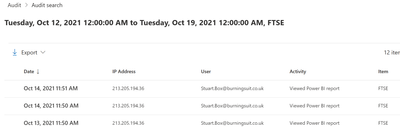
I don't know about other options, but this information is definitely in the audit logs. If you are a Power BI Admin, you could access this information from there.
For example..
Hope this helps
Stuart
If you have recently started exploring Fabric, we'd love to hear how it's going. Your feedback can help with product improvements.
A new Power BI DataViz World Championship is coming this June! Don't miss out on submitting your entry.
Share feedback directly with Fabric product managers, participate in targeted research studies and influence the Fabric roadmap.